Upgrading DataCore AI
Explore this Page
Overview
DataCore AI can update itself from DataCore. Automatic updates are enabled by default. To disable them, set AGENT_UPDATE_ENABLED=false in /etc/ssy-agent/agent.env and run sudo dcai restart. If you run the installer again, updates stay disabled. When updates are enabled:
- Automatic checks and downloads: DataCore AI checks for a new version every hour and downloads it in the background. You can keep working during the download.
- Installation requires your acceptance: DataCore AI does not install a downloaded version until you click Restart to update. Any signed-in user can click Restart to update. If the new version comes with a revised license agreement, you must also accept it.
- Verified updates: DataCore signs each update, and DataCore AI verifies the signature before it installs the update.
- Rollback of failed updates: If the new version does not pass its health check within 3 minutes, DataCore AI returns to the previous version automatically and does not offer that version again.
The update check uses outbound HTTPS to api.dis.io, and the downloads come from datacoredownloads.blob.core.windows.net. Refer to Prerequisites.
Upgrading DataCore AI
To upgrade DataCore AI, follow the steps below:
- When a new version is ready, a banner displays Version X is downloaded and ready to install.
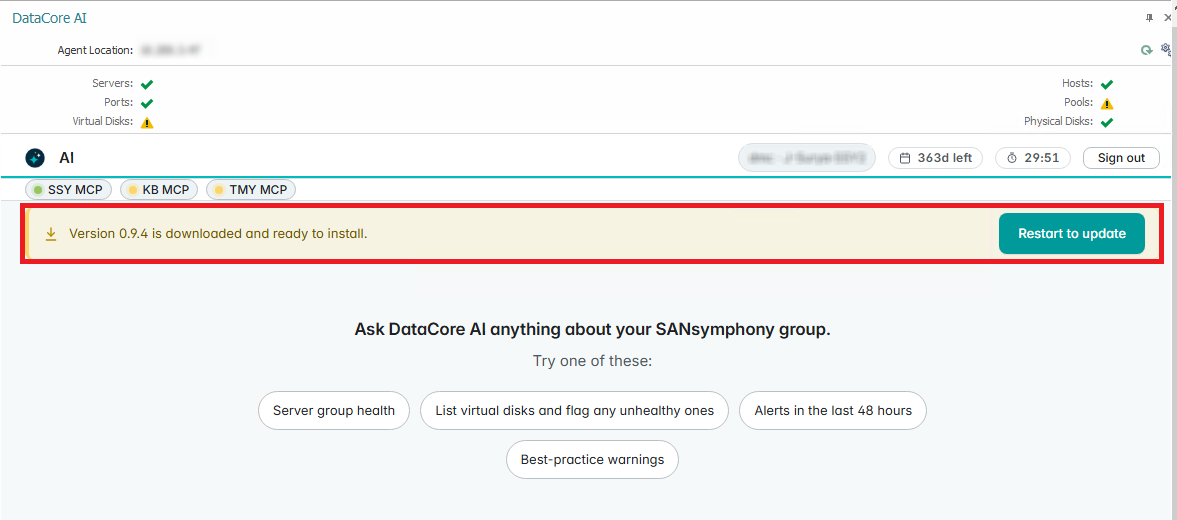
- Click Restart to update.
- If the new version includes a revised license agreement, read it to the end and click I accept — restart to update.
- DataCore AI restarts and signs everyone out. The update usually takes one to two minutes. Keep the page open. It displays Updated to version X. Reloading… and then reloads automatically.
An update also brings the dcai commands up to date. The first sudo dcai command that you run after the update uses the new version.
You cannot ask questions while DataCore AI restarts, and a message that you send during the restart is not delivered. Upgrade at a quiet time.
For the messages that DataCore AI displays during an upgrade, refer to Status Messages for DataCore AI Upgrades.
Upgrading with the Installer
You can also upgrade DataCore AI with a new installer archive from DataCore. Extract the archive on the DataCore AI host, and then run sudo bash install.sh. The installer updates the existing installation in place and keeps your settings and license. Refer to Modifying or Uninstalling DataCore AI.
Upgrading DataCore AI Behind a Proxy
If the DataCore AI host reaches the internet through a proxy, the following points apply when you install or update DataCore AI:
- If the DataCore AI host reaches the internet only through a proxy, you must install DataCore AI 1.1 from the release archive and set the proxy during installation. DataCore AI 1.0 has no proxy setting. Refer to Using DataCore AI Behind a Proxy.
- If DataCore AI 1.0 is installed and reaches the internet directly, it can update to 1.1. After the update, you can set the proxy with
sudo dcai set-proxy. - On an installed DataCore AI 1.1 or later, an update keeps the proxy setting, its user name and password, and the certificates last copied by
trust-host-certificates. - Updates download from
datacoredownloads.blob.core.windows.net, which the proxy must allow.
Learn More