Prerequisites
Explore this Page
- Overview
- Deployment Overview
- Installation Checklist
- System Requirements
- Software Requirements
- Network Requirements
Overview
Before you install DataCore AI, review what you need to get started. Begin with the Installation Checklist, and then use the following sections for the details.
Deployment Overview
A DataCore AI deployment has two parts:
- DataCore AI: Runs as Docker containers on a Linux host.
- SANsymphony REST service: The SANsymphony REST service is installed on a Windows machine as part of the DataCore Management Tools.
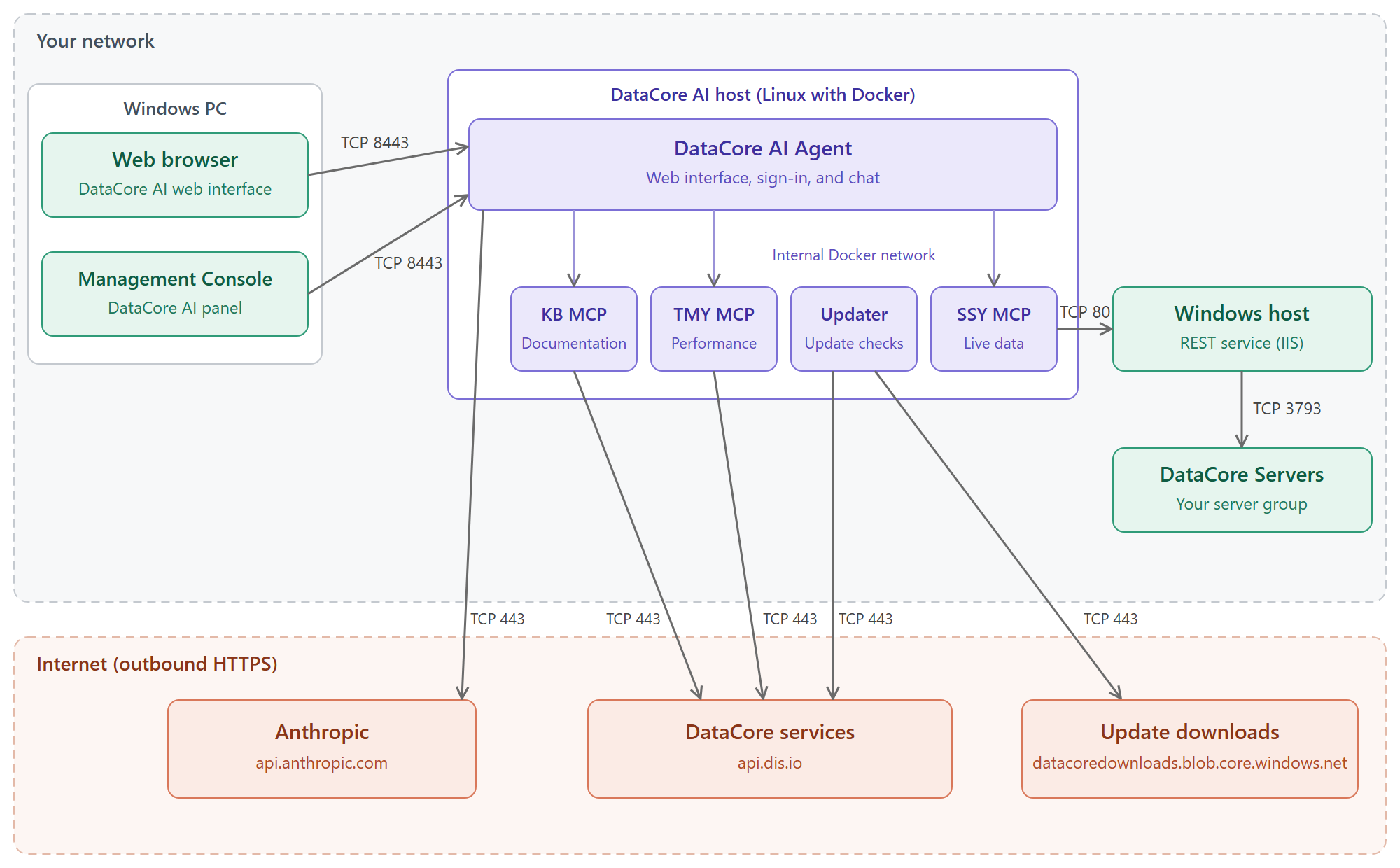
The DataCore Management Console and the Windows host with the REST service can run on a DataCore Server or on a separate machine.
Installation Checklist
- Linux host: A Linux host that runs Ubuntu, Debian, Red Hat Enterprise Linux (RHEL), Rocky Linux, or CentOS Stream, and that meets the system requirements below. Docker Engine and Docker Compose v2 must be installed on it. To install DataCore AI, you also need administrator access with root privileges (sudo).
- DataCore Management Tools: Install them on a DataCore Server, or on a separate Windows machine that can reach your DataCore Servers. This installs the SANsymphony REST service.
- Anthropic account and API key: You must have a valid Anthropic account. Create an API key in the Anthropic Console.
- DataCore AI license key: Generate the key in the DataCore License Portal. You need a license before you can sign in. Refer to Generating a Base Tier License Key.
- Firewall rules: Allow the DataCore AI host to reach
api.anthropic.comandapi.dis.ioover HTTPS (TCP 443). Allow your browser or the DataCore Management Console to reach the DataCore AI host on TCP 8443. Optionally, for DataCore AI to download the updates, you can also allow access todatacoredownloads.blob.core.windows.net. Allow the DataCore AI host to reach the DataCore Management Tools host on TCP 80. Refer to Network Requirements below. If a proxy controls outbound traffic, the proxy must allow the same three hosts. Refer to Using DataCore AI Behind a Proxy.
DataCore does not provide an Anthropic API key. You must use a key from your own Anthropic account.
System Requirements
DataCore AI Host
| Component | Minimum | Recommended |
|---|---|---|
| Processors | 2 cores, x86-64 | 4 cores, x86-64 |
| Memory | 4 GB RAM | 8 GB RAM |
| Disk space | 10 GB available | 20 GB available |
ARM processors are not supported. The installer does not enforce the minimum figures, but it warns you if Docker's storage directory has less than 3 GB of free space.
DataCore AI runs on a RHEL-family host with SELinux enforcing, including when Docker's own SELinux support is turned on. No SELinux change is needed.
A static IP address is recommended for the DataCore AI host, but it is not required.
DataCore Management Tools Host
- Windows Server 2016 or later.
- Microsoft .NET Framework 4.7.2 or later.
- Internet Information Services (IIS). The installer enables IIS if it is not already enabled.
- Network access to the DataCore Servers in your server group.
Software Requirements
| Component | Requirement |
|---|---|
| SANsymphony | SANsymphony PSP21 or PSP22. DataCore AI 1.1 is tested and validated with these versions. |
| Operating system | Ubuntu, Debian, Red Hat Enterprise Linux (RHEL), Rocky Linux, or CentOS Stream on the DataCore AI host. |
| Docker | Docker Engine with the Docker Compose v2 plugin. The Docker Compose plugin must be version 2.21 or later. The Docker service must be running, and docker compose version must run successfully. The installer checks both before it makes any changes. To install Docker Engine and the Docker Compose plugin, follow the instructions for your distribution in the Docker documentation: Install Docker Engine. |
| Privileges | You need root access (sudo) on the DataCore AI host to install DataCore AI and to run its administrative commands. Refer to Data Privacy and Security for the privileges that DataCore AI itself uses. |
| DataCore Management Tools | Install the DataCore Management Tools (REST Support, DataCore Management Console, and the optional DataCore Cmdlets for Windows PowerShell) on a DataCore Server or on a separate Windows machine. DataCore AI uses the Telemetry Service (DataCore Intelligence Service) for performance-related answers through TMY MCP. To enable these answers, ensure that Telemetry Service version 1.9.2 or later is installed on the DataCore Servers in your server group. Refer to Installing the DataCore Management Tools. |
| Microsoft Edge WebView2 Runtime | Required by the DataCore AI panel. The DataCore Management Console installation installs it automatically if it is not already present. |
Network Requirements
The following table lists the network connections that DataCore AI uses. Before you install, make sure that your firewall allows each required connection.
| Connection | Port and protocol | Direction | Required? | Purpose |
|---|---|---|---|---|
| Web interface | TCP 8443, HTTPS (configurable) | Inbound: from your workstations and DataCore Management Console machines to the DataCore AI host | ✓ | Required to open DataCore AI in a web browser or in the DataCore AI panel. |
| SANsymphony REST service | TCP 80, HTTP | Outbound: from the DataCore AI host to the DataCore Management Tools host | ✓ | Lets DataCore AI read live information about your server group. |
api.anthropic.com
|
TCP 443, HTTPS | Outbound: from the DataCore AI host to the internet | ✓ | Connects DataCore AI to the Anthropic AI model that writes the answers. |
api.dis.io
|
TCP 443, HTTPS | Outbound: from the DataCore AI host to the internet | ✓ | Connects DataCore AI to DataCore hosted services for documentation search, performance baselines, license check-ins, update checks, usage statistics, and the feedback that you send. If this address is blocked, documentation and performance questions cannot be answered, and sign-in is blocked 30 days after the last successful license check-in. |
datacoredownloads.blob.core.windows.net
|
TCP 443, HTTPS | Outbound: from the DataCore AI host to the internet | ✗ (optional) | Used only to download updates. DataCore AI checks for updates through api.dis.io. If this address is blocked, DataCore AI continues to work, but it cannot download updates. |
DataCore AI requires outbound internet access, directly or through a proxy (DataCore AI 1.1 and later), and does not support offline installations. Refer to Using DataCore AI Behind a Proxy.
Learn More