Enable Capacity Optimization on an Existing Virtual Disk
You can enable Capacity Optimization for an existing virtual disk on the Virtual Disk Details page. To enable it for a new virtual disk, see Create a New Virtual Disk with Capacity Optimization.
The Capacity Optimization settings will be visible even if the virtual disk's server(s) and pool(s) are not configured for Capacity Optimization yet. In this case, DataCore Web Console will provide links to configure the server(s) and pool(s) that are not yet set up for Capacity Optimization. See Enable Capacity Optimization for a Server.
For mirrored virtual disks, it is not required that Capacity Optimization be enabled for all copies. If Capacity Optimization is enabled for one copy of a mirrored virtual disk, the same settings will be enabled for all copies.
To enable Capacity Optimization for an existing virtual disk:
-
Open the Virtual Disk Details page for the virtual disk you want to enable Capacity Optimization for.
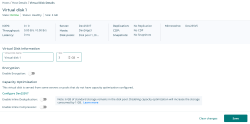
- Under Capacity Optimization, click the toggle switches for the settings that you want to enable: Enable Inline Deduplication and/or Enable Inline Compression.
- Click Save. A confirmation message will be displayed.