Post-Processing Deduplication
Explore this Page
- Overview
- Deduplication Use Cases (Post-Processing)
- Best Practices for Deduplication (Post-Processing)
- DataCore Deduplication Console (Post-Processing)
Overview
In DataCore Post-Processing Deduplication, data is written to the disk and then optimized (deduplicated) on the disk. Post-Processing Deduplication runs in the background at low priority and has minimal impact on application I/O.
The DataCore Post-Processing Deduplication tool creates deduplication pools in DataCore SANsymphony that leverage the proven capabilities of the Windows' Data Deduplication feature. Virtual disks created from these pools will be deduplicated on a schedule configured automatically by the tool. DataCore Post-Processing Deduplication extends the benefits of deduplication beyond the Windows operating system to any file system type while providing the advanced data services of DataCore SANsymphony. The deduplication pool requires an existing DataCore SANsymphony disk pool, referred to as the "storage source pool" to create a Deduplication pool in the DataCore Deduplication Console.
The Deduplication tool runs independently from the DataCore Management Console. The tool can be run locally on one server in a group or from a remote DataCore Management Console. The DataCore Deduplication Console is the user interface for the tool and can be used to create and manage deduplication pools on all servers in the server group.
For information about creating and managing deduplication pools, including configuring schedules and automated maintenance tasks, see Deduplication Tasks (Post-Processing).
DataCore Post-Processing Deduplication should not be used in conjunction with DataCore Inline Deduplication and Inline Compression.
The Deduplication tool requires DataCore SANsymphony 10.0 PSP15 Update 3 or later and Windows Server 2016 operating system or later (provided that the operating system version is supported by this software.) In addition, the Windows' Data Deduplication role must be enabled from Server Manager > Server Roles > File and Storage Services > File and iSCSI Services > Data deduplication. (Refer to the Microsoft documentation for more information about roles.)
Deduplication Use Cases (Post-Processing)
Post-processing data deduplication offers benefits such as lower storage space requirements and more efficient disk space use. Deduplication can optimize storage and reduce the amount of disk space consumed—when applied to the right data. Deduplication savings will vary widely based on the data type.
Generally, good candidates for deduplication are files that have plenty of duplication, are accessed less frequently, and have relatively static content. Poor candidates are files that change often and are constantly accessed by users or applications.
Good Candidates for Deduplication
- General file shares: for example, group content publication and sharing, user home folders, and folder redirection/off-line files
- Software deployment shares: for example, software binaries, images, and updates
- Virtualization depot or provisioning library: for example, templates for virtual machines and virtual desktops, as well as virtual hard disk (VHD) file storage for provisioning to hypervisors
- Database backup volumes: for example, SQL Server and Exchange Server backup volumes
Candidates that should be evaluated based on content:
- Line-of-business servers
- Static content providers
- Web servers
Deduplication is not recommended for:
- Hypervisors (other than virtual hard disks and machine templates)
- Servers running Windows Server Update Services (WSUS), also known as Software Update Services (SUS)
- Servers running live databases: for example, Exchange Server or SQL Servers
- Virtual desktop instances.
Deduplication is not supported for files that are open and constantly changing for extended periods of time or have high I/O requirements.
Post-processing deduplication is not supported and has not been tested for combined use with the following software features:
- Virtual disks with the Sequential Storage feature enabled.
- Virtual disks with Continuous Data Protection (CDP) enabled.
- Virtual disks using the Snapshot or Replication features.
- Disk pools of type Shared Multi-port Array (SMPA).
- Disk pools with Automated Storage Tiering feature enabled.
Estimated Savings with Deduplication (Post-Processing)
| Scenario | Data types | Typical Space Savings |
|---|---|---|
|
User documents |
Documents, photos, music, videos |
30-50% |
|
Deployment shares |
Software binaries, cab files, symbols files |
70-80% |
|
Virtualization libraries |
Virtual hard disk files |
80-95% |
|
General file share |
File shares with all of the above data types |
50-60%
|
Typical space savings are as reported by Microsoft. Results will vary by data type, mix, and file size. Microsoft provides a DDPEval tool to evaluate savings for Microsoft systems. For more information, refer to Microsoft documentation. DataCore Software can not guarantee your results will match those of our examples or estimated savings.
Best Practices for Deduplication (Post-Processing)
- The maximum size of a deduplication pool is 64 TB.
- DataCore recommends creating mirrored virtual disks using a storage source from two deduplication pools so that both sides of the mirror are deduplicated.
- Information in the DataCore Deduplication Console (Post-Processing) is refreshed when the console is opened, deduplication pools are created, or schedules are updated. However, it is not automatically refreshed in real time. Before performing any operation or reviewing the data in the console, click Refresh to manually update the information.
- Once the deduplication pool is created, do not add disks to the deduplication pool (except temporarily in the case of changing pool size, see Changing the Deduplication Pool Size (Post-Processing)). Do not add pool mirrors.
- Creating a deduplication pool will create objects which will be visible in the DataCore Management Console and are identified as being "Internal Use" for the deduplication pool. Do not modify objects created and labeled as "Internal Use" or deduplication pools and deduplication tasks may fail.
- Do not change the script files and tasks that are automatically generated for each deduplication pool. (See Automated Post-Processing Deduplication Tasks.)
- Creating a deduplication pool will create an "internal use only" volume in Disk Management with the same name as the pool. Do not rename the volume, or change or remove the drive letter in Disk Management. (The first available drive letter will be assigned to the volume. A drive letter must be available for use in order to create a deduplication pool.)
- Because the deduplication type is post-processing deduplication, making copies of data (such as adding a mirror to a single virtual disk or replacing a mirrored storage source) will consume the true amount of data and later be deduplicated.
- The performance class and write-aware auto-tiering settings in storage profiles for virtual disks created from a deduplication pool (which consists of one disk) will have no effect because there will only be one tier in a deduplication pool.
- Actual deduplication savings are realized in the SAUs of the storage source pool and the volume created from it. Only when an entire SAU is deduplicated will it be realized as free space in the storage source pool. The allocated storage space in the storage source pool will vary based on the SAU size of that pool and the number of contiguous blocks that are deduplicated. Some of the deduplicated space may be in SAUs that remain allocated to the volume but which are available for reuse with that volume only.
- Event messages from the Data Deduplication service are found in Computer Management > System Tools > Event Viewer > Applications and Services Logs > Microsoft > Windows > Deduplication.
- After a DataCore Server restarts or the server is shut down and restarted, it will take a brief moment for the deduplication pool status to go healthy (Running).
- After replacing a server or adding/changing physical disks on a DataCore Server with deduplication pools, ensure that the drive letters originally assigned to deduplication volumes created for each deduplication pool remain the same. (To identify the drive letters, see the Disk Pool Details page for each deduplication pool in the DataCore Management Console. The drive letter is contained in the description.)
- If a deduplication volume goes off-line in Disk Management, the deduplication pool created from it will be off-line. In this case, the volume must be remounted by running the task Internal Use - Mount Dedup VHD [#] for the correct volume. To identify the correct task to run for the volume, open Tasks in the DataCore Management Console. The task description contains the drive letter, deduplication pool name, and the DataCore disk ID. (To check the status of volumes, see the DataCore Disk Details page for each DataCore disk named "Internal Use For [deduplication pool name]" in DataCore Management Console, The status is displayed under the icon in the top left corner or under Disk Information in the Info tab. The Info tab also displays the Index number used in Disk Management.)
- Do not run disk defragmentation software on deduplication volumes used to create deduplication pools or volumes created from deduplication pools.
In the Windows operating system, defragmentation is a maintenance mode task that occurs automatically during optimization. Drives are optimized automatically by default, so optimization must be disabled for volumes involved in deduplication. Settings for scheduled optimization must be changed by the administrator in the Windows Defragment and Optimize Drives utility, so that volumes used in deduplication pools and volumes created from deduplication pools are not selected for optimization. See Microsoft documentation for more information.
Oversubscription and Inflation
A pool is oversubscribed when the total size of all virtual disks created from the pool is greater than the size of the pool. Oversubscription simplifies capacity planning and maximizes capacity utilization. This is an acceptable practice and System Health safeguards such as available space threshold settings are provided for each pool so that administrators may increase the pool size before running out of space.
On the other hand, administrators should be aware of potential issues that could result from drastically oversubscribing the storage source pool. Deduplication optimizes data capacity and therefore administrators may feel confident to oversubscribe by the amount of estimated savings or more. Note that deduplication will subscribe, but not necessarily allocate, 20% more space than the size specified for the deduplication pool.
Certain events can cause a full mirror recovery which will cause previously deduplicated data to "inflate" (or become undeduplicated) to full size.
An auto-generated task is configured to run automatically when the available space on the storage source pool falls below the Attention threshold that is configured in the pool settings. When the task is triggered, the task will run a high priority deduplication on the affected deduplication pools. (See Automated Post-Processing Deduplication Tasks for more information.) High priority deduplication will result in decreased performance while running due to the significant workload on the system. It is also theoretically possible that the high priority deduplication may not keep up with inflation if system resources are insufficient.
DataCore Deduplication Console (Post-Processing)
The DataCore Deduplication Console presents information about DataCore Servers, pools, disks, and savings in a single console so that administrators have information needed to create and manage deduplication disk pools for a server group.
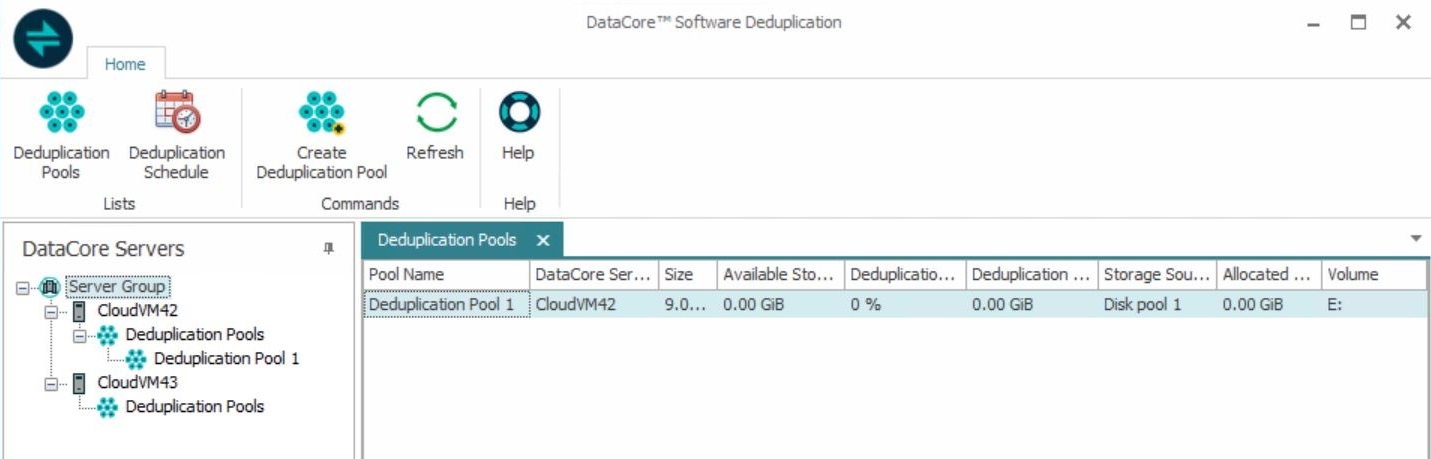
The console includes:
- A Deduplication Pools List displayed in the right pane.
- Name, size, available storage, and the DataCore Server where the pool is located
- Deduplication rate and deduplication savings
- Storage source pool which was used to create the deduplication pool and the storage space allocated from it.
- Drive letter of the deduplication volume created for Internal Use of the deduplication pool.
Information in the list is automatically refreshed when the console is opened, deduplication pools are created, or schedules are updated. Click Refresh to manually update the information.
- A wizard that automates the creation of deduplication pools in this software.
- The ability to set the deduplication schedule for a DataCore Server.
- A panel that displays all deduplication pools in the server group at a glance. Pools are listed by DataCore Server. Click on servers or pools to open detail pages.
- Detail pages for Deduplication pools and DataCore Servers showing information pertinent to deduplication.
- A Refresh button to update information in the Deduplication Pool lists.
- A Help button that opens to the Deduplication topic in the online Help.
To open the console:
- Open the Deduplication tool from the Apps menu under Apps menu>DataCore>DataCore Deduplication.
- In the Connect to Server Group dialog box:
- Connect to the server where the deduplication pool will be created.
- Enter the user name and password to login to the server. Explicit (not default) credentials are required.
(If domain credentials are used, include the domain with the name for example: DOMAIN\user name.)
- Click Connect to continue.
Information about deduplication pools is gathered for the server group and may take a moment to display.
DataCore Server Details
Information pertaining to deduplication and the deduplication pools is collected and displayed for each DataCore Server in a DataCore Server Details page. The deduplication schedule can also be set for the server in this page.
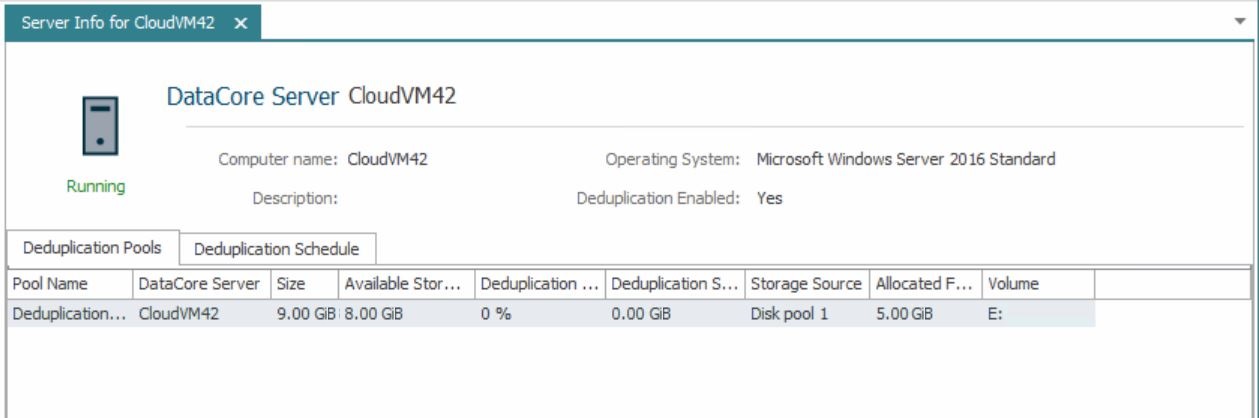
At the top of the page:
- The DataCore Server status is displayed at the top of the page under the server icon.
- The computer name, description, operating system is displayed.
- The page will show if the Data Deduplication role is enabled.
To open the details page:
- In the DataCore Deduplication Console, click the server in the left panel to open the details page.
| DataCore Server Details Tabs | |
|---|---|
| Deduplication Pools |
Displays deduplication pools created on the server and general information:
A deduplication pool without virtual disks created can be deleted from this list from the context menu. |
| Deduplication Schedule | Provides the current deduplication schedule settings for the server and enables changes to the current settings. See Setting the Deduplication Schedule. |
Deduplication Pool Details
Information for each deduplication pool is collected and displayed in a Disk Pool Details page.
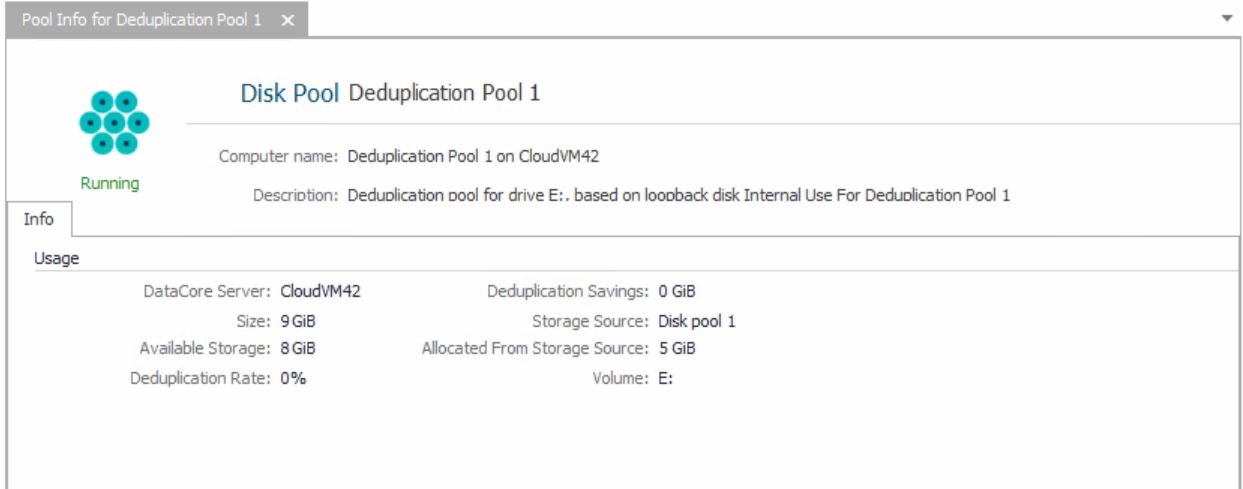
At the top of the page:
- The deduplication pool status is displayed at the top of the page under the server icon. (All disk pool status applies to a deduplication pool except for Redundancy Failed.)
- The computer name and description is displayed. The description cannot be edited.
To open the details page:
- In the DataCore Deduplication Console, click the deduplication pool in the left panel to open the details page.
The Info tab displays usage details such as: server name, pool size, available storage, deduplication rate and savings, storage source of the pool (the DataCore SANsymphony disk pool that was used as the storage source for the deduplication pool), amount of storage allocated from the storage source for the deduplication pool, and drive letter assigned to the deduplication volume created from the storage source pool.
Learn More