NFS RWX Using the Puls8 NFS Driver
Explore This Page
- Overview
- How It Works
- When to Use NFS RWX
- Requirements
- Licensing
- Security and Authentication Model
- StorageClass Configuration Reference
- Provisioning NFS RWX Volumes
- Using the Volume in Your Pods
- Best Practices
- Considerations and Limitations
- Benefits of NFS ReadWriteMany (RWX)
Overview
DataCore Puls8 replicated block storage (Replicated PV Mayastor) delivers high-performance block volumes, but a block volume can be attached to only one node at a time (ReadWriteOnce, RWO). Many workloads require the opposite: multiple pods, distributed across multiple nodes, reading from and writing to the same data simultaneously (ReadWriteMany, RWX).
The DataCore Puls8 NFS driver addresses this requirement. When an RWX volume is requested, the driver provisions a Replicated PV Mayastor block volume, wraps it in a dedicated in-cluster NFS server, and exports it over the network. Every pod that mounts the claim communicates with that single export and sees the same files. Enterprise-grade Kerberos encryption and LDAP identity resolution can be layered on top when moving to production, without changes to the application.
This document describes how to provision, secure, and manage NFS ReadWriteMany (RWX) volumes in DataCore Puls8, including requirements, StorageClass configuration, the available security modes (sys, Kerberos, and LDAP), snapshots and restore, online expansion, high availability, and using shared volumes in your workloads.
How It Works
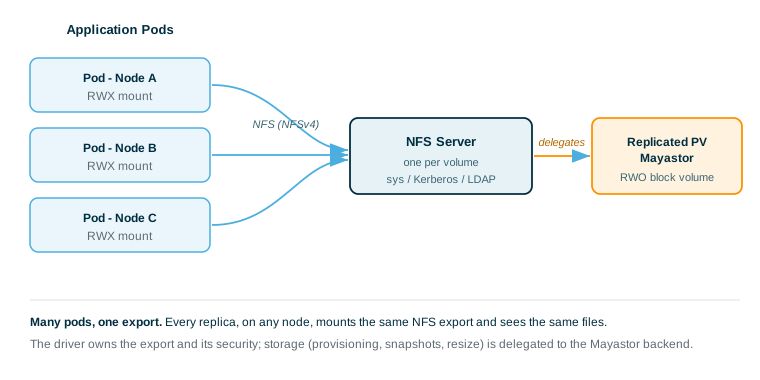
- One NFS Server per Volume: Each NFS volume is served by a dedicated NFS server pod managed entirely by Kubernetes; no manual administration is required.
- Lazy Start: When the PVC is created, the backend volume and the server's supporting resources are created, but the server itself remains at zero replicas. The server starts on the first pod mount and then stays running to serve all clients, including through unmounts, so a later pod re-attaches to the same server and data.
- Thin Delegation Layer: The driver owns the NFS export and its security model (sys, Kerberos, or LDAP) and delegates all storage operations to the backend Replicated PV Mayastor CSI driver. Provisioning, snapshots, and resize are performed on the backend volume, which is why snapshot, restore, and expansion are surfaced through NFS as backend features.
When to Use NFS RWX
Use NFS RWX when:
- Multiple pods must share a single filesystem (RWX). Typical cases include a web CMS with a shared uploads directory, machine-learning jobs whose workers share a dataset, a CI system with a shared artifact cache, or a legacy application that expects a POSIX shared folder.
- You already run DataCore Puls8 / Replicated PV Mayastor and want shared storage without a separate NAS appliance.
- You want a simple development configuration now and enterprise authentication (Kerberos/LDAP) later, without modifying the application.
Do not use NFS RWX when:
- A single pod owns the volume; plain RWO Replicated PV Mayastor is faster and simpler.
- Object storage or raw block semantics are required; this feature provides a POSIX file share.
Requirements
Ensure the following requirements are met before provisioning NFS RWX volumes.
Common (All Modes)
- DataCore Puls8 / Replicated PV Mayastor: Must be installed and healthy, with a usable backend StorageClass (for example,
mayastor-3). Each NFS volume is backed by a Replicated PV Mayastor RWO PVC.
kubectl get diskpools -n mayastor
kubectl get storageclass # confirm the backend StorageClass exists- NFS Client Tools: Must be installed on every worker node that will mount NFS volumes.
# Ubuntu / Debian
apt-get install -y nfs-common

# RHEL/CentOS/Fedora
dnf install -y nfs-utils- NFS Driver and License: The NFS driver must be installed (controller plus node DaemonSet in
Runningstate), and a valid license must be active (see Licensing).
Additional for LDAP
- LDAP Server: A reachable, standards-compliant LDAP server (OpenLDAP, 389-DS, or Active Directory) whose users carry POSIX attributes (
uidNumber,gidNumber,objectClass: posixAccount) and whose groups carryobjectClass: posixGroupandmemberUid. - Bind Account: A read-only bind account, and a Secret holding its credentials in the driver namespace (see StorageClass Configuration Reference).
Additional for Kerberos (krb5 / krb5i / krb5p)
- KDC: MIT Kerberos, FreeIPA, or Active Directory.
- Kerberos Configuration:
/etc/krb5.confon every node, pointing at your realm/KDC. The NFS server pod reads this file from the host via a HostPath mount; distributing it to every node is the operator's responsibility (Ansible, a DaemonSet, or node configuration management).
[libdefaults]
    default_realm = EXAMPLE.COM
    dns_lookup_realm = false
    dns_lookup_kdc = false
    rdns = false

[realms]
    EXAMPLE.COM = {
        kdc = kdc.example.com
        admin_server = kdc.example.com
    }

[domain_realm]
    .example.com = EXAMPLE.COM
    example.com = EXAMPLE.COM
Set rdns = false. With reverse DNS enabled, the client builds a different service principal than the one the keytab holds, and the mount fails with no obvious cause.
- rpc-gssd: Running on every node with
rpc_pipefsmounted. This is a kernel-level requirement of the NFS client and cannot be containerized.
apt-get install -y nfs-common krb5-user
mount -t rpc_pipefs sunrpc /var/lib/nfs/rpc_pipefs
echo "sunrpc /var/lib/nfs/rpc_pipefs rpc_pipefs defaults 0 0" >> /etc/fstab
systemctl enable --now rpc-gssd- Node Machine Keytab:
/etc/krb5.keytab(host/<fqdn>@REALM) on every node that will mount a Kerberos volume. The mount authenticates the node via this keytab; a node without a keytab cannot mount akrb5*export. - NFS-Server Keytab: One per volume, provided by one of two methods (see StorageClass Configuration Reference).
Licensing
The NFS RWX feature is license-gated. A valid DataCore Puls8 license (trial or full) must be active on the cluster to provision new NFS RWX volumes. For instructions on installing and activating a license, refer to the License Activation documentation.
Exactly two operations are license-gated: creating a volume and creating a snapshot. Mount (publish), unmount (unpublish), expansion, and deletion are not gated.
- No License: Provisioning is refused. A PVC or snapshot created against the NFS RWX driver remains
Pending, with events carrying the messagevalid license required to perform operation. The rejection uses a retryable status, so the external provisioner continues to retry and the PVC binds automatically once a valid license is installed; no manual re-apply is required. - Trial License: A trial activates the feature for 30 days. If the trial elapses without a full license, new provisioning is refused again; existing volumes continue running.
- Running Volumes Are Never Interrupted: Licensing is enforced only on the create and create-snapshot control path, never on the data path. Already-bound volumes continue serving I/O even if the license is deactivated, expires, or the cluster falls out of compliance. Only new volume and snapshot creation is blocked.
- Agent-Unreachable Grace: License state is cached and refreshed approximately every 60 seconds. If the license agent is briefly unreachable, provisioning continues on the last-known-compliant state for a 180-second grace window; beyond that, the check fails closed (provisioning is refused) until the agent is reachable again.
Keep a valid license active before provisioning. Losing the license later does not take data offline; it only prevents the creation of new NFS RWX volumes.
Security and Authentication Model
Two independent settings determine identity and access. Review both before selecting a mode.
securityMode: How the Server Verifies Identity
| Mode | Meaning | Wire Protection |
|---|---|---|
sys
|
Honor system; the client's raw UID/GID are trusted as sent | None |
krb5
|
Kerberos ticket required (verified identity) | Authenticated |
krb5i
|
Kerberos plus integrity checksums (tamper-evident) | Authenticated + integrity |
krb5p
|
Kerberos plus encryption (private) | Authenticated + integrity + encrypted |
sys requires no additional infrastructure and is appropriate for trusted or development clusters. krb5p is the strongest option and the recommended production channel.
export.squash: Whether the Server Preserves or Flattens Identity
| Setting | Effect on Root (UID 0) | Effect on Normal Users |
|---|---|---|
No_Root_Squash (default) |
Stays root on the server | Unchanged |
Root_Squash
|
Mapped to anonymous (default 65534) | Unchanged |
All_Squash
|
Mapped to anonymous | Everyone mapped to anonymous |
Anonymous_uid / Anonymous_gid (default 65534, the conventional nobody:nogroup) is the identity that squashed clients assume.
LDAP Identity Resolution
Adding an ldap block enables server-side group resolution. The server ignores the group list sent by the client and instead queries the directory (via SSSD to LDAP) for the user's actual group membership. This makes the server, not the client, the authority on group membership, so a pod cannot spoof its groups, and it removes the AUTH_SYS 16-supplementary-group limit. With LDAP, ls -la shows real usernames, and the same username maps to the same UID/GID on every node.
Kerberos and LDAP serve different purposes. Kerberos authenticates who you are; LDAP resolves your UID/GID and groups. With Kerberos but no LDAP, authenticated users have no name mapping and appear as numeric UIDs (or nobody/65534). Use LDAP when named, consistent identities are required.
Combining Modes
| Mode | Authentication | Identity Mapping | Typical Use |
|---|---|---|---|
sys
|
None | None | Development / trusted cluster |
sys + LDAP |
None | LDAP to consistent UID/GID/groups | Development/test needing identity consistency |
krb5p
|
Kerberos, encrypted | None (numeric) | Encrypted transport, no directory |
krb5p + LDAP |
Kerberos, encrypted | LDAP to named users | Recommended for production |
All_Squash is rejected in combination with Kerberos or LDAP (validation error on export.squash), because flattening every user to a single anonymous identity discards the identity those systems compute. Use Root_Squash or No_Root_Squash instead.
StorageClass Configuration Reference
A StorageClass for this driver uses provisioner: com.datacore.puls8.nfs. Parameters are flat key-to-string values; nested settings (export, kerberos, ldap, server) are YAML-encoded strings under their respective keys.
Parameter Table
| Parameter | Required | Default | Description |
|---|---|---|---|
backendStorageClass
|
Yes | - | Backend (Replicated PV Mayastor) StorageClass from which the real RWO volume is provisioned. Must be a Replicated PV Mayastor StorageClass; see the note below the table. |
securityMode
|
No | sys
|
sys, krb5, krb5i, or krb5p |
export
|
No | see export Block | Squash, access, anonymous IDs (YAML string) |
kerberos
|
Required if securityMode is not sys |
- | Realm and keytab source (YAML string) |
ldap
|
No | - | LDAP/SSSD identity configuration (YAML string) |
server
|
No | see server Block | Server pod resources and scheduling (YAML string) |
The Replicated PV Mayastor CSI driver (io.openebs.csi-mayastor) is the only backend that is tested and accepted. No other driver is supported.
The driver applies this restriction to every backend object it is handed, so it governs more than provisioning. Each of the following fails, reporting that the NFS backend must be provisioned by one of the accepted drivers:
- The provisioner of the
backendStorageClass. The NFS PVC does not bind. - The driver behind a volume adopted through the
nfs.puls8.datacore.com/backend-pvcannotation. The adopted PVC is left unclaimed. - The driver behind the
backendSnapshotClassused for snapshot delegation. The VolumeSnapshot never reachesreadyToUse.
A backendStorageClass or backendSnapshotClass that does not exist reports a different error, stating that the object was not found.
Unknown top-level parameters are ignored with a warning; unknown keys inside the export, kerberos, ldap, or server blocks are rejected.
imagePullPolicy is not a StorageClass parameter. The image pull policy for the NFS server pods is set once at install time through the Helm values (image.pullPolicy, or global.imagePullPolicy for all components); placing it in a StorageClass has no effect and is ignored with a warning.
The following standard Kubernetes StorageClass fields also apply and are significant here:
| Field | Recommended | Reason |
|---|---|---|
allowVolumeExpansion
|
true
|
Required to resize volumes |
reclaimPolicy
|
Delete
|
Cleans up the backend volume on PVC deletion (dynamic mode) |
volumeBindingMode
|
Immediate
|
Provisions as soon as the PVC is created |
mountOptions
|
see Mount Options | NFS client options applied at mount time |
PVC Annotations
Some behavior is controlled by annotations rather than StorageClass parameters. Placement matters: an annotation set on the wrong object is silently ignored.
| Annotation | Set On | Description |
|---|---|---|
nfs.puls8.datacore.com/backend-pvc
|
NFS PVC | Adopts a pre-existing RWO PVC instead of provisioning a new backend volume. Value format: <driver-namespace>:<pvc-name>. |
nfs.puls8.datacore.com/export-sub-path
|
Backend PVC | Subdirectory of an adopted volume to export. Default: the volume root. No StorageClass or NFS-PVC equivalent. |
nfs.puls8.datacore.com/recovery-sub-path
|
Backend PVC | Directory where lock-recovery data is kept on an adopted volume. Default: .ganesha. Must be a directory (not the root), and not the exported directory or a parent of it. |
puls8.datacore.com/lifeline-grace-period
|
NFS PVC | Overrides the failover grace period for this volume (see High Availability). |
puls8.datacore.com/nfs
|
Backend PVC (driver-set) | Stamped by the driver on an adopted backend PVC to claim it; its value is the NFS volume ID. You never set this - read it to confirm an adoption took effect. |
The two sub-path annotations are read only from the backend PVC, never from the NFS PVC or the StorageClass. Setting them on the wrong object has no effect.
Mount Options
The driver injects sensible defaults at mount time, so a working mount requires no mountOptions:
| Injected Default | Meaning |
|---|---|
vers=4.1
|
NFS protocol version |
hard
|
Retry indefinitely on server timeout (protects data integrity) |
sec=<securityMode>
|
GSS flavor derived from the StorageClass securityMode; you need not set sec yourself |
The mount layer also supplies the server address and port automatically, and adds ro for read-only mounts. Any option added to the StorageClass mountOptions list is merged on top; if an option belongs to the same either/or group as a default (for example soft vs hard, ac vs noac), the specified option replaces the default. Common additions:
| Option | Reason |
|---|---|
noac
|
No attribute caching; every client sees fresh data/metadata immediately. Essential for RWX coherence across pods; trades some performance for consistency. |
nconnect=8
|
Opens 8 TCP connections per mount for higher throughput. |
export Block
export: |
  squash: No_Root_Squash    # No_Root_Squash | Root_Squash | All_Squash
  access: RW                # RW | RO
  anonymousUid: 65534       # identity used for squashed access
  anonymousGid: 65534
  rootMode: "0777"          # permissions on the top of the share (or "none" to leave adopted volumes untouched)
rootMode sets the permission bits on the top directory of the share. On a volume the driver creates, the default is 0777, because a brand-new filesystem root is otherwise writable only by root; on an adopted volume the driver leaves the existing root untouched unless rootMode is set. Use any octal mode, or none to leave it alone. If the identity that arrives (after squash and any LDAP mapping) cannot write to the root, clients mount successfully and then fail on the first write; the server logs the export root's mode and owner at start-up.
Choosing a Squash Setting:
| Scenario | Recommended |
|---|---|
| Development / trusted cluster, non-root containers | No_Root_Squash
|
| Containers may run as root, but root should not be granted on the share | Root_Squash
|
| Public/scratch share, identity irrelevant | All_Squash (not allowed with Kerberos/LDAP) |
| Production (krb5p + LDAP) | Root_Squash
|
kerberos Block
Required when securityMode is krb5, krb5i, or krb5p.
kerberos: |
  realm: EXAMPLE.COM
  # provide exactly ONE of:
  keytabSecret: nfs-server-keytab     # manual: pre-create the keytab Secret
# kadminSecret: kdc-admin-creds # auto: driver mints the service keytab itself- Manual (
keytabSecret): Create the NFS-server principal and keytab on the KDC and store it as a Secret (keynfs.keytab) in the driver namespace. - Auto (
kadminSecret): Provide the driver with kadmin credentials (keysprincipalandpassword); it creates the principal and keytab itself via an init step before the server starts.
keytabSecret and kadminSecret are mutually exclusive.
For the manual route, the server principal name is derived by the driver and must be exactly:
nfs/nfs-svc-<volume-id>.<driver-namespace>.svc.<cluster-domain>@<REALM>The <volume-id> is not the PVC name. It is pvc- followed by the PVC's UID (for example pvc-4f98e010-adeb-4e49-a888-6288083012e0), and this holds for adopted volumes too. Because that UID exists only once the PVC does, the manual route is a two-pass task: create the PVC against a StorageClass whose keytabSecret does not exist yet, let provisioning fail (the PVC stays Pending and keeps retrying), read the UID, build the keytab, and create the Secret under the name the StorageClass already references. The next retry finds it and the volume binds.
DRIVER_NS="puls8"
CLUSTER_DOMAIN="cluster.local"
REALM="EXAMPLE.COM"

# Volume ID = "pvc-" + the PVC's UID (not its name)
VOLUME_ID="pvc-$(kubectl get pvc <your-pvc> -n <your-ns> -o jsonpath='{.metadata.uid}')"
PRINCIPAL="nfs/nfs-svc-${VOLUME_ID}.${DRIVER_NS}.svc.${CLUSTER_DOMAIN}@${REALM}"

# On the KDC:
kadmin.local -q "addprinc -randkey ${PRINCIPAL}"
kadmin.local -q "ktadd -k /tmp/nfs-${VOLUME_ID}.keytab ${PRINCIPAL}"

# Store under the exact name the StorageClass references:
kubectl create secret generic <the-keytabSecret-name> -n $DRIVER_NS \
  --from-file=nfs.keytab=/tmp/nfs-${VOLUME_ID}.keytab
The keytabSecret value is used verbatim - the driver does not expand a <volume-id> placeholder - so a keytab is tied to one volume's principal, and a StorageClass using keytabSecret serves exactly one volume. For more than one, use a StorageClass per volume, or use kadminSecret. The <cluster-domain> is usually cluster.local, and the realm comes from the kerberos block. The kadminSecret route needs none of this, as the driver builds the principal itself.
ldap Block
ldap: |
  servers: ldap://ldap.example.com   # space-separated for failover
  baseDn: dc=example,dc=com
  userSearchBase: ou=users,dc=example,dc=com
  groupSearchBase: ou=groups,dc=example,dc=com
  bindSecret: ldap-bind-creds        # Secret with keys bindDn + password
  tlsEnabled: true                   # use TLS (set false only on isolated networks)
  caCertSecret: ldap-ca-cert         # optional: CA cert Secret for strict TLS
The bind Secret must exist in the driver namespace and use the fixed keys bindDn and password.
server Block
All fields are optional; omit the block to use defaults.
server: |
  cpu: { request: 200m, limit: 2000m }
  memory: { request: 512Mi, limit: 2Gi }
  nodeSelector: { disktype: ssd }
  tolerations:
    - { key: dedicated, operator: Equal, value: nfs, effect: NoSchedule }
  labels: { team: storage }
  priorityClassName: high-priority
  hostNetwork: false           # true: server uses host network, Service becomes headless
  port: 2049                   # NFS port
  lifelineGracePeriod: 3m      # default HA rescue grace for this SC's volumes
Secrets Summary (All in the Driver Namespace)
DRIVER_NS=puls8

# LDAP bind (when ldap: is set)
kubectl create secret generic ldap-bind-creds -n $DRIVER_NS \
  --from-literal=bindDn="cn=nfs-service,ou=Services,dc=example,dc=com" \
  --from-literal=password="<password>"

# NFS server keytab, manual Kerberos mode
kubectl create secret generic nfs-server-keytab -n $DRIVER_NS \
  --from-file=nfs.keytab=/path/to/nfs.keytab

# kadmin credentials, auto Kerberos mode
kubectl create secret generic kdc-admin-creds -n $DRIVER_NS \
  --from-literal=principal="admin/admin@EXAMPLE.COM" \
  --from-literal=password="<kadmin-password>"

# LDAP CA certificate, optional strict TLS
kubectl create secret generic ldap-ca-cert -n $DRIVER_NS \
  --from-file=ca.crt=/path/to/ca.crt
Provisioning NFS RWX Volumes
Every example uses provisioner: com.datacore.puls8.nfs and an RWX PVC. Replace mayastor-3 and the driver namespace (puls8) with the values for your cluster.
Shared RWX Volume (sys)
The simplest configuration: multiple pods share one volume, raw UID/GID on the wire, no Kerberos or LDAP.
apiVersion: storage.k8s.io/v1
kind: StorageClass
metadata:
  name: nfs-sys
provisioner: com.datacore.puls8.nfs
reclaimPolicy: Delete
volumeBindingMode: Immediate
allowVolumeExpansion: true
parameters:
  backendStorageClass: mayastor-3
  securityMode: sys
  export: |
    squash: No_Root_Squash
    access: RW
mountOptions: ["noac", "hard", "nconnect=8"]apiVersion: v1
kind: PersistentVolumeClaim
metadata:
name: shared-data
namespace: my-app
spec:
accessModes: [ReadWriteMany]
storageClassName: nfs-sys
resources:
requests:
storage: 10GiPoint a multi-replica Deployment at shared-data (see Using the Volume in Your Pods) and every replica, on any node, shares the files.
Server-Side Identity with LDAP (sys + LDAP)
Add an ldap block. The server resolves each user's actual groups from the directory, so a pod that presents no group information can still obtain group-based access, and file ownership displays consistent named users.
apiVersion: storage.k8s.io/v1
kind: StorageClass
metadata:
  name: nfs-sys-ldap
provisioner: com.datacore.puls8.nfs
reclaimPolicy: Delete
volumeBindingMode: Immediate
allowVolumeExpansion: true
parameters:
  backendStorageClass: mayastor-3
  securityMode: sys
  export: |
    squash: No_Root_Squash
    access: RW
  ldap: |
    servers: ldap://ldap.example.com
    baseDn: dc=example,dc=com
    userSearchBase: ou=users,dc=example,dc=com
    groupSearchBase: ou=groups,dc=example,dc=com
    bindSecret: ldap-bind-creds
    tlsEnabled: true
mountOptions: ["noac", "hard"]
Create the ldap-bind-creds Secret in the driver namespace before creating the PVC.
Encrypted NFS with Kerberos (krb5p)
Every RPC is authenticated and encrypted. This requires the Kerberos node prerequisites (see Requirements). Without an ldap block, authenticated users have no name mapping and may appear as nobody (65534), which is acceptable when only access enforcement, not per-user identity, is required.
apiVersion: storage.k8s.io/v1
kind: StorageClass
metadata:
  name: nfs-krb5p
provisioner: com.datacore.puls8.nfs
reclaimPolicy: Delete
volumeBindingMode: Immediate
parameters:
  backendStorageClass: mayastor-3
  securityMode: krb5p
  export: |
    squash: No_Root_Squash
    access: RW
  kerberos: |
    realm: EXAMPLE.COM
    kadminSecret: kdc-admin-creds     # or keytabSecret: nfs-server-keytab
mountOptions: ["sec=krb5p", "noac", "hard"]
Full Enterprise (krb5p + LDAP)
The recommended production configuration: encrypted transport with named, consistent identities resolved server-side.
apiVersion: storage.k8s.io/v1
kind: StorageClass
metadata:
  name: nfs-krb5p-ldap
provisioner: com.datacore.puls8.nfs
reclaimPolicy: Delete
volumeBindingMode: Immediate
allowVolumeExpansion: true
parameters:
  backendStorageClass: mayastor-3
  securityMode: krb5p
  export: |
    squash: Root_Squash
    access: RW
  kerberos: |
    realm: EXAMPLE.COM
    kadminSecret: kdc-admin-creds
  ldap: |
    servers: ldap://ldap.example.com
    baseDn: dc=example,dc=com
    userSearchBase: ou=users,dc=example,dc=com
    groupSearchBase: ou=groups,dc=example,dc=com
    bindSecret: ldap-bind-creds
    tlsEnabled: true
mountOptions: ["sec=krb5p", "noac", "hard"]
Adopt an Existing Backend Volume
An existing RWO Replicated PV Mayastor PVC can be exposed as RWX without re-provisioning or copying data. Set an annotation on the NFS PVC naming the backend PVC as <driver-namespace>:<pvc-name>. The driver wraps that PVC in an export instead of creating a new backend volume.
apiVersion: v1
kind: PersistentVolumeClaim
metadata:
  name: shared-data
  namespace: my-app
  annotations:
    nfs.puls8.datacore.com/backend-pvc: "puls8:legacy-data"   # <ns>:<name>
spec:
  accessModes: [ReadWriteMany]
  storageClassName: nfs-sys
  resources:
    requests:
      storage: 5Gi        # must be <= the backend PVC's capacity
Requirements for the backend PVC: it must reside in the driver namespace, be Bound, and be ReadWriteOnce; its capacity must be greater than or equal to the size requested by the NFS PVC; and it must not already be claimed by another NFS volume (each backend PVC backs one NFS volume).
After the NFS PVC binds, confirm the adoption took effect by reading the claim annotation the driver stamps on the backend PVC. Its value is the NFS volume ID.
kubectl get pvc <backend-pvc> -n puls8 -o jsonpath='{.metadata.annotations.puls8\.datacore\.com/nfs}'An adopted backend PVC is never deleted by the driver. Deleting the NFS PVC leaves the backend PVC and its data intact and re-adoptable; you own its lifecycle. In default dynamic mode, the driver creates and deletes the backend PVC for you.
When adopting a volume, the recovery-sub-path annotation on the backend PVC is validated at provisioning. Three mistakes are rejected outright, so the NFS PVC stays Pending with the message on it:
- Naming the directory you are exporting:
is the exported directory; every client would be denied. - Naming the volume root (
.or empty):is the backend volume root; name a directory instead. - An absolute path (leading
/):must be relative to the backend volume root, not absolute.
One case is not caught at provisioning: if recovery-sub-path names an existing file, the volume binds and then the server pod crashloops with exists but is not a directory. Look at the server pod rather than the PVC. Point the annotation at a directory (or remove the file) and recreate the volume, since the exported and recovery paths are fixed at creation.
Snapshot and Restore
Snapshots are delegated to the backend CSI driver. Create two VolumeSnapshotClass objects: an NFS class that points at a backend class.
# Backend snapshot class; driver MUST match your backend CSI provisioner
apiVersion: snapshot.storage.k8s.io/v1
kind: VolumeSnapshotClass
metadata:
  name: nfs-backend-snapclass
driver: io.openebs.csi-mayastor
deletionPolicy: Delete
---
# NFS snapshot class; delegates to the backend class above
apiVersion: snapshot.storage.k8s.io/v1
kind: VolumeSnapshotClass
metadata:
  name: nfs-snapclass
driver: com.datacore.puls8.nfs
deletionPolicy: Delete
parameters:
backendSnapshotClass: nfs-backend-snapclassapiVersion: snapshot.storage.k8s.io/v1
kind: VolumeSnapshot
metadata:
name: shared-data-snap
namespace: my-app
spec:
volumeSnapshotClassName: nfs-snapclass
source:
persistentVolumeClaimName: shared-dataRequest exactly the size the snapshot reports. The backend requires a clone to match its snapshot size, so a larger request is rejected and the PVC stays Pending with a Cloned snapshot volume must match the snapshot size error on the backend claim. Read the size from the snapshot, then grow the volume after it binds if you need more room.
kubectl -n my-app get volumesnapshot shared-data-snap -o jsonpath='{.status.restoreSize}'apiVersion: v1
kind: PersistentVolumeClaim
metadata:
name: shared-data-restored
namespace: my-app
spec:
accessModes: [ReadWriteMany]
storageClassName: nfs-sys
resources:
requests:
storage: 10Gi # must equal the snapshot's restoreSize exactly
dataSource:
apiGroup: snapshot.storage.k8s.io
kind: VolumeSnapshot
name: shared-data-snapThe restore PVC remains Pending until the snapshot is readyToUse, then binds automatically. PVC-to-PVC cloning is not supported; creating a PVC with a dataSource of kind PersistentVolumeClaim fails with volume cloning is not supported. Restore from a snapshot instead.
Online Volume Expansion
A volume can be grown in place, even while pods are mounted and performing I/O. The expansion is delegated to the backend resizer. This requires allowVolumeExpansion: true on both the NFS StorageClass and the backend StorageClass; if the backend forbids it, expansion is rejected.
kubectl -n my-app patch pvc shared-data \
  -p '{"spec":{"resources":{"requests":{"storage":"20Gi"}}}}'
Mounted pods observe the larger filesystem without remount or restart. If no pod has ever mounted the volume, it expands offline: the backend filesystem is resized when the server next starts, not at request time. Because that is also the first moment a client can reach the export, no client ever observes the old size.
High Availability (Lifeline)
NFS server pods are rescue targets of the DataCore Puls8 Lifeline controller (they automatically carry the puls8.datacore.com/lifeline-target: true annotation). If the node running a volume's NFS server becomes NotReady, Lifeline waits the grace period, then force-deletes the stranded server pod and clears its stale volume attachments, so the StatefulSet reschedules it onto a healthy node. The backend volume re-attaches there and hard-mounted clients resume I/O without data loss.
The grace period (a duration such as 30s or 2m) can be tuned:
- Per Volume: Annotation on the PVC,
puls8.datacore.com/lifeline-grace-period: 2m. - Per StorageClass:
server.lifelineGracePeriod(see the StorageClass Configuration Reference), used as the default when the PVC has no annotation.
The PVC annotation takes precedence over the StorageClass default. An unparseable value fails provisioning with an event naming the invalid value; validate the format before applying.
What Clients See: With the default hard mount, clients pause and then resume during a failover - no I/O errors and no lost writes. A pod doing continuous I/O appears to freeze for the recovery window and then continues. A server pod restart or move on a healthy cluster resumes in roughly 30 seconds; a full node failure is dominated by the grace period above (about 6 to 7 minutes with the shipped 5-minute default), after which recovery takes seconds.
Kerberos and LDAP are on the restart path. If the NFS server restarts while the KDC is unreachable, it cannot fetch its keytab and the volume stays unavailable until the KDC returns; existing mounts and their locks are unaffected, only a restart blocks. If it restarts while LDAP is unreachable, it comes up but cannot resolve users until LDAP returns, so ownership and group permissions behave as if the directory were empty. Plan KDC and LDAP availability alongside the cluster's.
Lock Reclaim: File locks (used by most databases and many queues) are reclaimed automatically after the server restarts or moves; applications do not re-take them. Briefly after a restart the server accepts reclaims from clients that held locks and rejects new lock requests until that window closes - typically under a minute and never more than 90 seconds. Clients only reading and writing see nothing. This requires every client machine to have a unique hostname; Kubernetes satisfies this by default (each node's hostname is its node name), but duplicate hostnames break lock reclaim.
Where Recovery Data Lives: The server keeps its lock-recovery state on the volume itself, in a reserved directory (.ganesha at the volume root by default) that is hidden from directory listings and refuses ordinary access. You do not manage, back up, or size for it.
Treat the hidden recovery directory as tidiness, not a security boundary; it prevents accidental access, not a client that deliberately goes looking. For hostile-tenant isolation, use separate volumes. On an adopted volume the directory can be relocated by setting nfs.puls8.datacore.com/recovery-sub-path on the backend PVC before the NFS volume is created; it must be a directory, not the root, and not the exported directory or a parent of it.
Moving Your Own Pods Off a Dead Node
The failover above brings the NFS server back. There is a second problem on your side of the mount: an application pod that was running on the dead node stays scheduled there, because Kubernetes will not move a pod off an unreachable node while its volume is still attached. The replica can sit Terminating, or simply stop making progress, long after the volume is healthy elsewhere.
The Lifeline controller can rescue such pods - when a node stops responding it force-deletes the pods that opted in and releases their volume attachments, so the replacement schedules on a healthy node. The NFS server pod is enrolled automatically; your application pods are opt-in, because force-deleting a pod is not safe for every workload. Opt a pod in by annotating the pod template (not the Deployment, and not the PVC):
apiVersion: apps/v1
kind: Deployment
metadata:
  name: my-app
  namespace: my-app
spec:
  template:
    metadata:
      annotations:
        puls8.datacore.com/lifeline-target: "true"
        # optional; how long to give the node before acting on this pod
        puls8.datacore.com/lifeline-grace-period: 60s
    spec:
      containers:
        - name: app
          image: my-app:latest
          volumeMounts:
            - name: shared
              mountPath: /data
      volumes:
        - name: shared
          persistentVolumeClaim:
claimName: shared-data- It force-deletes: The pod is removed without a graceful shutdown, so if your application depends on its
preStophook or a clean flush, leave this off and let the workload's own controller handle the failure. - Give the replacement somewhere to go: A rescued pod helps only if the scheduler can place it.
requiredDuringSchedulinganti-affinity across nodes, or a replica count equal to the node count, leaves the replacementPending; usepreferredanti-affinity instead.
Using the Volume in Your Pods
Multi-Replica Deployment (Any Mode)
apiVersion: apps/v1
kind: Deployment
metadata:
  name: my-app
  namespace: my-app
spec:
  replicas: 3                    # all replicas share the one volume
  selector:
    matchLabels: { app: my-app }
  template:
    metadata:
      labels: { app: my-app }
    spec:
      # Spread replicas across nodes to exercise real multi-node RWX
      affinity:
        podAntiAffinity:
          preferredDuringSchedulingIgnoredDuringExecution:
            - weight: 100
              podAffinityTerm:
                topologyKey: kubernetes.io/hostname
                labelSelector: { matchLabels: { app: my-app } }
      containers:
        - name: app
          image: my-app:latest
          volumeMounts:
            - { name: shared, mountPath: /data }
      volumes:
        - name: shared
          persistentVolumeClaim:
            claimName: shared-data
Matching Identity (sys Mode)
In sys mode, file ownership is by numeric UID/GID. Set the pod's identity so that it owns or can access the files. On any shared share - anything with ldap:, or any use of group permissions - set both runAsUser and runAsGroup:
runAsGroup is not stylistic. Omit it and the pod's primary group defaults to 0 (or 65534 under Root_Squash), and that group is stamped on every file the pod creates. Because every pod without runAsGroup defaults to the same group, the group permission bits stop distinguishing anyone and a 0660 file effectively behaves like 0666: it looks correctly restricted, but every pod on the share can open it. With LDAP, group membership for reading is authoritative on the server (it rebuilds the group list from the UID via SSSD), but that check is only as good as the group the file was created with, so runAsGroup still matters.
Do not use fsGroup on these shares. It is not another way to set the group - it asks the kubelet to walk and re-own the entire volume at mount time. On a share with squash: Root_Squash the kubelet's root is squashed, the walk is refused, and the pod never starts (applyFSGroup failed ... permission denied); fsGroupChangePolicy: OnRootMismatch does not avoid it. Use runAsGroup instead - it is a plain process credential and never touches the volume.
supplementalGroups behaves differently depending on whether the class sets ldap:. With LDAP it is ignored for access decisions - the server rebuilds the group list from the UID, so declared extra groups are discarded; put the membership in the directory instead. Without LDAP the server trusts the credential as sent, so supplementalGroups is how a pod joins additional groups, up to the 16 that AUTH_SYS carries. Either way it never sets the group on a new file - that always comes from runAsGroup.
Kerberos-Authenticated Pods
In any krb5* mode the mount works only while the accessing user has a valid Kerberos ticket, and one detail drives everything else: the ticket is used by the node, not by the pod. Each node runs rpc.gssd, which looks for the ticket cache on the node's filesystem at /tmp/krb5cc_<uid> for the UID doing the I/O. A ticket obtained only inside the container, in a path only the container can see, is never found and the mount is refused. There are two workable approaches.
Option A - One identity per node (no per-pod setup): Give each node a machine keytab (with host, root, and nfs principals) and every pod on that node shares that identity. The pod spec needs nothing extra - no kinit, Secret, or environment variables. Use this when every workload on the share can act as the same identity.
Option B - Per-user credentials (real per-user identity): Use this when different applications must appear as different users, which is the point of running with LDAP. An init container runs kinit and writes the ticket cache to the node's /tmp through a hostPath; the application container runs as the matching UID. The user must exist in both the KDC (for authentication) and LDAP (for the UID/GID), or authentication succeeds and files come out owned by nobody.
spec:
  securityContext:
    runAsUser: 10001          # the user's UID in LDAP
    runAsGroup: 10001
  initContainers:
    - name: kinit
      image: my-krb5-client:latest    # any image with kinit
      command: ["sh", "-c"]
      args:
        - |
          set -e
          export KRB5_CONFIG=/krb5/krb5.conf
          export KRB5CCNAME=FILE:/host-tmp/krb5cc_$(id -u)
          kinit -kt /etc/krb5-user/alice.keytab alice@EXAMPLE.COM
      volumeMounts:
        - { name: user-keytab, mountPath: /etc/krb5-user, readOnly: true }
        - { name: krb5-conf,   mountPath: /krb5,          readOnly: true }
        - { name: host-tmp,    mountPath: /host-tmp }
  containers:
    - name: app
      image: my-app:latest
      volumeMounts:
        - { name: shared,   mountPath: /data }
        - { name: host-tmp, mountPath: /host-tmp }
  volumes:
    - name: shared
      persistentVolumeClaim: { claimName: shared-data-krb5 }
    - name: user-keytab
      secret: { secretName: alice-keytab }
    - name: krb5-conf
      configMap: { name: krb5-conf }
    - name: host-tmp
hostPath: { path: /tmp, type: Directory }- KRB5CCNAME must point at the host-visible path, and the file name must end in the UID doing the I/O (
krb5cc_10001for UID 10001). - runAsUser must match the UID LDAP gives the user; a ticket for one user under a different UID is refused.
- The pod also needs your realm's
krb5.conf, published as a ConfigMap in the application namespace. - Keep the ticket alive: Kerberos tickets expire. For long-running workloads, re-run
kiniton a schedule (a sidecar loopingkinitthensleepat well under the ticket lifetime); it refreshes the same cache in place, with no restart.
The ticket cache is per node, keyed by UID: it lives at /tmp/krb5cc_<uid> on the node, so every pod on that node running as that UID uses whichever ticket is there, including one a different pod placed there. Two workloads that must not act as each other should not share a UID, and a pod that stops needing its identity keeps it until the ticket expires or is removed. Give each identity its own UID where that matters.
Without LDAP (krb5, krb5i, or krb5p alone) there is no directory to resolve principals against, so authentication still works but files appear owned by the anonymous user. Use Kerberos with LDAP when file ownership must mean something.
Diagnosing Kerberos Mount Failures
A mount that fails in a krb5, krb5i, or krb5p mode reports which part of the Kerberos chain did not complete, so that the node prerequisites and the credential can be told apart. Each message carries a reason, which is the part to read first.
| Reason | Meaning | What to check |
|---|---|---|
KerberosPrereqMissing
|
The kernel could not set up Kerberos for the mount at all. | Confirm that rpc-gssd is running on the node, that rpc_pipefs is mounted, and that /etc/krb5.keytab is present. This reason can also indicate an invalid mount option. |
KerberosKeytabStale
|
Kerberos was set up, but rpc.gssd obtained no usable credential. |
The host keytab is most likely stale. Refresh the node credential and retry the mount. |
Both reasons point at the node, not at the StorageClass or the export. A volume whose StorageClass is correct still fails to mount on a node that was never provisioned for Kerberos, so confirm the node prerequisites before revisiting the security configuration.
Read-Only Mount
volumes:
  - name: shared
    persistentVolumeClaim:
      claimName: shared-data
      readOnly: true
Alternatively, make the whole export read-only with export: | access: RO on the StorageClass.
Best Practices
- Start Simple, Harden Later: Develop on
sys, then switch the StorageClass tokrb5p+ LDAP for production. Application manifests do not change. - Always set
noacandhardfor shared RWX workloads.noacprovides cross-pod read-after-write coherence;hardprotects against data loss during transient server unavailability. - Use
nconnect=8for throughput-sensitive workloads. - Enable
allowVolumeExpansion: trueon both the NFS and backend StorageClasses up front; volumes cannot be resized without it. - Prefer auto Kerberos (
kadminSecret) unless policy forbids granting the driver kadmin rights; it avoids minting and rotating a keytab Secret per volume. - Use
Root_Squashin multi-tenant and production shares so that a rogue root container cannot bypass ownership. - Keep TLS enabled for LDAP (
tlsEnabled: true) outside isolated test networks. - Spread client replicas across nodes (pod anti-affinity) to genuinely exercise and test multi-node RWX.
- Keep a valid license active before provisioning. Data remains online without it, but new volumes cannot be created.
- Size the backend correctly for adoption: the NFS request must be less than or equal to the backend PVC capacity, and the backend PVC must be RWO and
Bound.
Considerations and Limitations
- RWX via NFS Semantics Only: This is a POSIX file share (NFSv4), not block or object storage. Expect NFS consistency and locking behavior.
- One NFS Server Pod per Volume: That server is a per-volume component; high availability is provided by Lifeline rescue, not by running multiple server replicas.
- PVC-to-PVC Cloning Is Not Supported: Use snapshot and restore.
All_SquashRestriction: Cannot be combined with Kerberos or LDAP.- Kerberos Requires Node-Level Setup:
rpc-gssd,rpc_pipefs,/etc/krb5.conf, and a machine keytab cannot be containerized; a node missing these cannot mountkrb5*volumes. - Adopted Backend PVCs Are Not Garbage-Collected: You own their lifecycle.
- NFSv4 Only: NFSv3 clients are not served.
- Resilience Follows the Backend: A volume is only as resilient as its backend StorageClass. A single-replica backend class means a node failure takes the data with it; use a multi-replica backend for redundancy.
- Exported Directory Is Fixed at Creation: The exported directory cannot be changed after the volume exists; editing it has no effect. To change it, recreate the NFS PVC (adoption preserves the backend) or move the data on the backend volume.
- Recovery Directory Is Fixed at Creation: The reserved lock-recovery directory is likewise fixed at creation. Both it and the exported directory are read only from the backend PVC of an adopted volume, never from the NFS PVC or the StorageClass.
- Grow-Only: Volumes can expand but never shrink; a smaller requested size is rejected.
- Reserved
.ganeshaName: Do not create a file or directory named.ganesha(or your chosen recovery-directory name) at the top of a volume - it is in use by the server. - Released Adopted Volumes Retain the Reserved Directory: Releasing an adopted volume leaves its reserved recovery directory behind; remove it yourself if you need the volume pristine.
- Kerberos Principals Are Not Deleted: The driver creates a service principal per volume and never removes it, so deleting a volume leaves a stale
nfs/nfs-svc-<volume-id>entry in the KDC. Nothing breaks, but prune them yourself if the KDC is audited or volumes are created in bulk.
Benefits of NFS ReadWriteMany (RWX)
- Shared Multi-Node Access: Multiple pods across multiple nodes read and write the same filesystem concurrently through a single RWX volume, which is not possible with plain RWO block storage.
- No Separate NAS Required: Shared storage is delivered on your existing DataCore Puls8 / Replicated PV Mayastor cluster, using the same pools and StorageClasses.
- Enterprise Security When You Need It: Layer Kerberos encryption and LDAP identity on top without changing application manifests; develop on
sysand promote tokrb5p+ LDAP for production. - Backend-Grade Data Services: Snapshots, restore, and online expansion are delegated to Replicated PV Mayastor, so they work through NFS with no extra tooling.
- Built-In High Availability: NFS servers are automatically protected by Lifeline rescue, so a node failure reschedules the server and clients resume I/O without data loss.
- Zero Server Administration: Kubernetes manages the per-volume NFS server end to end; there is nothing to deploy or maintain manually.
Learn More