DataCore Puls8 on Air-Gapped Environments
Explore this Page
- Overview
- Requirements
- Downloading the Artifacts
- Mirroring Images to Your Private Registry
- Installing on the Air-Gapped Cluster
- Verifying the Installation
- Reference: Image Registries and Override Behavior
- Save Images Script
- Push Images Script
- Benefits of Using DataCore Puls8 in Air-Gapped Environments
Overview
This document describes how to install DataCore Puls8 on a Kubernetes cluster that has no direct internet access (an air-gapped or offline environment). The examples use Puls8 v4.6, substitute your target release wherever the version appears.
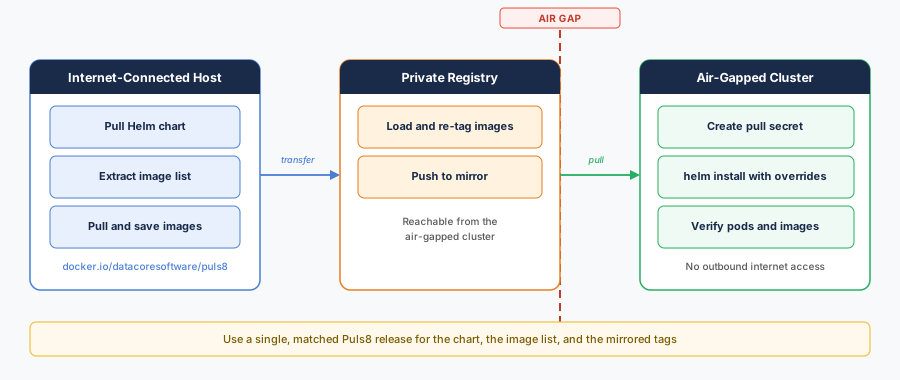
In an air-gapped environment, cluster nodes cannot pull images from public registries such as Docker Hub or registry.k8s.io. The installation therefore mirrors the required container images into a private container registry that the cluster can reach, and transfers the DataCore Puls8 Helm chart directly to the air-gapped environment. The chart is then installed against that mirrored registry using Helm value overrides.
This document walks through three parts.
| Section | Where It Runs | What It Does |
|---|---|---|
| Downloading the Artifacts | Internet-connected host | Pull the Helm chart and extract the image list. |
| Mirroring Images to Your Private Registry | Internet-connected host (and, if disconnected, a registry-connected host) | Copy every image into your private registry. |
| Installing on the Air-Gapped Cluster | Air-gapped cluster | Deploy the chart against the private registry. |
The chart version, the images.txt bundled inside that chart, and the image tags you mirror must all come from the same Puls8 release. Mixing versions leads to missing-image and digest-mismatch errors during installation.
Requirements
Ensure the following requirements are met before installing DataCore Puls8 in an air-gapped environment.
On the Internet-Connected Host (the Download Host)
- Docker or Podman, with authenticated access (
docker login) to your private registry. - Helm v3.8 or later (for OCI registry support) and
kubectl. - Sufficient free disk space to pull, and if needed archive, all images.
On the Air-Gapped Cluster
- A private OCI registry reachable from every node - for example Harbor, JFrog Artifactory, Amazon ECR, Quay, or a self-hosted
registry:2. - Registry credentials, if the registry requires authentication.
- Nodes prepared for the storage engines you intend to use (for example, HugePages and the
nvme_tcpkernel module for Replicated PV Mayastor).
All Puls8 storages - Replicated PV Mayastor, Local PV Hostpath, Local PV LVM, and Local PV ZFS support amd64 (x86_64). On arm64, every storage is supported except Replicated PV Mayastor, which is currently amd64-only. If your cluster runs on arm64, follow the arm64 guidance in Mirroring Images to Your Private Registry and Installing on the Air-Gapped Cluster.
Conventions
This document uses two shell variables in its examples. Set them to match your environment before running the commands.
export PRIVATE_REGISTRY="registry.internal.example.com:5000"   # your registry host (include port/project path if applicable)
export PULS8_VERSION="4.6.1"                                    # the Puls8 release you are installing
Wherever you see <PRIVATE_REGISTRY> in a configuration file, replace it with your registry host.
Downloading the Artifacts
Perform the below steps on the internet-connected download host.
Pull the Helm Chart
The Puls8 chart is published as an OCI artifact on Docker Hub. Pull it with Helm.
mkdir -p puls8-airgap && cd puls8-airgap

helm pull oci://docker.io/datacoresoftware/puls8 --version ${PULS8_VERSION}
# Produces: puls8-4.6.1.tgz
Extract the Image List
Each Puls8 chart bundles an images.txt file that lists every container image the chart can deploy. This list is the authoritative source for mirroring. Extract it from the chart archive.
tar -xzf puls8-${PULS8_VERSION}.tgz puls8/images.txt
cp puls8/images.txt images.txt

grep -cvE '^\s*(#|$)' images.txt   # prints the number of images to mirror
The images span four public registries: docker.io, ghcr.io, quay.io, and registry.k8s.io.
Mirroring every entry is harmless and is the simplest approach. You can also mirror a subset, based on the storage engines you enable and the optional components you deploy. Choose that subset by component, not by registry, as the registry an image comes from does not indicate whether your installation needs it.
Mirroring Images to Your Private Registry
Puls8 images originate from several public registries. When you later set global.imageRegistry, the chart replaces the source registry host but preserves the remainder of the image path. Each image must therefore be mirrored to your private registry with its repository path intact.
| Source Image | Mirrored Image |
|---|---|
docker.io/openebs/etcd:3.6.4-debian-12-r0
|
<PRIVATE_REGISTRY>/openebs/etcd:3.6.4-debian-12-r0
|
docker.io/openebs/minio:RELEASE.2024-12-18T13-15-44Z
|
<PRIVATE_REGISTRY>/openebs/minio:RELEASE.2024-12-18T13-15-44Z
|
registry.k8s.io/sig-storage/csi-attacher:v4.8.1
|
<PRIVATE_REGISTRY>/sig-storage/csi-attacher:v4.8.1
|
In short: remove the leading registry host and prepend <PRIVATE_REGISTRY>/.
Two helper scripts automate this, driven by the images.txt from Downloading the Artifacts. Their full source is provided in Save Images Script and Push Images Script.
| Script | Role |
|---|---|
puls8-save-images.sh
|
Pulls every image in images.txt, and optionally exports them to a single tar.gz. |
puls8-push-images.sh
|
Retags each image onto <PRIVATE_REGISTRY> (preserving the repository path and tag) and pushes it. |
Both scripts accept -l|--image-list, support Podman via the CONTAINER_CLI=podman environment variable, and ignore blank and commented lines so you can edit images.txt freely. Make them executable once.
Select the workflow that matches your network topology:
- Connected jump host - a single host can reach both the internet and the private registry. Mirror images directly.
- Fully disconnected - save images to an archive, transfer it across the air gap on physical media, then load and push.
Option A: Connected Jump Host
No archive is required. Pull the images, then push them directly to the registry. Omit --images on both steps so the script works with the locally pulled images.
docker login ${PRIVATE_REGISTRY}

# Pull every image listed in images.txt
./puls8-save-images.sh --image-list images.txt

# Retag and push each image to the private registry
./puls8-push-images.sh --registry ${PRIVATE_REGISTRY} --image-list images.txt
Option B: Fully Disconnected
-
On the download host, pull and export all images to a single archive.
CopyPull and Export All Images to an Archive./puls8-save-images.sh \
--image-list images.txt \
--images puls8-images-${PULS8_VERSION}.tar.gzCopy the following files onto your transfer media:
puls8-images-4.6.1.tar.gz- the image bundlepuls8-4.6.1.tgz- the Helm chartimages.txt- the image listpuls8-push-images.sh- the push script
- Transfer the media across the air gap to a host that can reach the private registry.
-
On the registry-connected host, load and push. The
--imagesflag instructs the script to load the archive before pushing.CopyLoad and Push Images from the Transferred Archivedocker login ${PRIVATE_REGISTRY}
./puls8-push-images.sh \
--registry ${PRIVATE_REGISTRY} \
--image-list images.txt \
--images puls8-images-${PULS8_VERSION}.tar.gzAlso copy
puls8-4.6.1.tgzto the host from which you will runhelm installin Installing on the Air-Gapped Cluster.
The docker save and docker load commands carry only the architecture that was pulled. If the download host and the cluster nodes differ in architecture, pull for the target platform with ./puls8-save-images.sh --platform linux/arm64 ..., or use skopeo copy --all to preserve full multi-architecture manifests.
arm64 clusters - Replicated PV Mayastor is not supported. The Replicated PV Mayastor ships amd64 images only and has no arm64 manifests, so pulling its images with --platform linux/arm64 will fail. The Local PV Hostpath, Local PV LVM, and Local PV ZFS storages all support arm64.
To install on an arm64 cluster:
- Disable Replicated PV Mayastor at install time. See Installing on the Air-Gapped Cluster.
- Remove the Replicated PV Mayastor image entries from your copy of
images.txtbefore mirroring, so they are not pulled for arm64. Keep the remaining entries for the other storages and the platform components. - Mirror the edited
images.txtusing Option A or Option B above, adding--platform linux/arm64to the save step.
Installing on the Air-Gapped Cluster
Run the below steps from a host with kubectl and helm access to the air-gapped cluster.
Create the Namespace
Create an Image Pull Secret
If your private registry requires authentication, create a pull secret in the puls8 namespace.
kubectl create secret docker-registry puls8-regcred \
  --namespace puls8 \
  --docker-server="${PRIVATE_REGISTRY}" \
  --docker-username='<user>' \
  --docker-password='<password>'
If your registry is unauthenticated, skip this step and omit the imagePullSecrets entries from the values file below.
Create airgap-values.yaml
Setting global.imageRegistry redirects most images to your private registry. However, several third-party sub-chart images - Grafana Alloy, Loki, NATS, MinIO, Velero, kubectl, External Secrets, and the Alloy config-reloader - do not honor the global setting and require explicit per-sub-chart overrides.
The values file below covers all of these images. It has been verified with helm template so that every rendered image resolves to the private registry. Replace <PRIVATE_REGISTRY> with your registry host before applying.
global:
  imageRegistry: "<PRIVATE_REGISTRY>" # Used by ZFS, LVM, Rawfile, Mayastor components and etcd
  imagePullSecrets:
    - puls8-regcred # Used by ZFS, LVM, Rawfile, Mayastor components and etcd
  image:
    registry: "<PRIVATE_REGISTRY>" # Used by Loki and Alloy
    pullSecrets:
      - name: puls8-regcred # Used by Alloy

# --- Sub-chart images NOT covered by global.imageRegistry ---

openebs:
  loki:
    imagePullSecrets:
      - name: puls8-regcred
    sidecar:
      image:
        repository: "<PRIVATE_REGISTRY>/kiwigrid/k8s-sidecar"
    minio:
      imagePullSecrets:
        - name: puls8-regcred
      image:
        repository: "<PRIVATE_REGISTRY>/openebs/minio"
      mcImage:
        repository: "<PRIVATE_REGISTRY>/openebs/mc"
  mayastor:
    nats:
      imagePullSecrets:
        - name: puls8-regcred
      nats:
        image:
          registry: "<PRIVATE_REGISTRY>"      # nats
      reloader:
        image:
          registry: "<PRIVATE_REGISTRY>"      # natsio/nats-server-config-reloader
      exporter:
        image:
          registry: "<PRIVATE_REGISTRY>"      # natsio/prometheus-nats-exporter

# Only required if backup is enabled (backup.enabled: true, for Velero integration)
backup:
  velero:
    image:
      repository: "<PRIVATE_REGISTRY>/velero/velero"            # tag comes from chart default
      imagePullSecrets:
        - puls8-regcred
    kubectl:
      image:
        repository: "<PRIVATE_REGISTRY>/openebs/kubectl"        # tag comes from chart default

# Only required if External Secrets is enabled (external-secrets.enabled: true, for KMS)
external-secrets:
  imagePullSecrets:
    - name: puls8-regcred # omit this block if your registry is unauthenticated
  image:
    repository: "<PRIVATE_REGISTRY>/datacoresoftware/external-secrets"   # tag comes from chart default
  webhook:
    imagePullSecrets:
      - name: puls8-regcred # omit this block if your registry is unauthenticated
    image:
      repository: "<PRIVATE_REGISTRY>/datacoresoftware/external-secrets"
  certController:
    imagePullSecrets:
      - name: puls8-regcred # omit this block if your registry is unauthenticated
    image:
      repository: "<PRIVATE_REGISTRY>/datacoresoftware/external-secrets"
Monitoring is enabled by default (monitoring.enabled: true), so the Grafana, Alloy, Loki, NATS, config-reloader, and Loki-MinIO overrides above apply to a standard installation. Backup (backup.enabled: false) and External Secrets (external-secrets.enabled: false) are disabled by default, so the Velero, kubectl, and External Secrets overrides take effect only when you enable those stacks. Overrides for a disabled stack are simply ignored, so it is safe to keep the full file. To disable monitoring, set monitoring.enabled: false.
arm64 clusters - disable Replicated PV Mayastor. It has no arm64 images. On an arm64 cluster, add the following to airgap-values.yaml (or pass --set openebs.engines.replicated.mayastor.enabled=false at install time). The remaining storages - Local PV Hostpath, Local PV LVM, and Local PV ZFS - operate normally.
openebs:
  engines:
    replicated:
      mayastor:
        enabled: false
Install the Chart
helm install puls8 ./puls8-${PULS8_VERSION}.tgz \
  --namespace puls8 \
  --values airgap-values.yaml
To also enable the backup stack, append --set backup.enabled=true. Monitoring is enabled by default.
Verifying the Installation
Confirm that all pods start and that every image is served from your private registry.
# All pods should reach Running/Completed with no ImagePullBackOff:
kubectl get pods -n puls8 -o wide

# Confirm images resolve to your private registry:
kubectl get pods -n puls8 \
  -o jsonpath='{range .items[*]}{range .spec.containers[*]}{.image}{"\n"}{end}{end}' \
  | sort -u

# Confirm imagePullSecrets is set on all pods:
kubectl get pods -n puls8 -o jsonpath='{range .items[*]}{.metadata.name}{"\t"}{.spec.imagePullSecrets}{"\n"}{end}'

# StorageClasses created by the enabled storage components:
kubectl get sc
If the second command lists any image from docker.io/, quay.io/, registry.k8s.io/, or ghcr.io/, an override was missed. Add the corresponding key to airgap-values.yaml and apply it with helm upgrade.
You can confirm that every image will resolve to your private registry without deploying anything by rendering the chart locally. The following command prints any image that is not redirected; an empty result means the configuration is complete.
# Monitoring is on by default; --set backup.enabled=true also renders the
# backup stack so its overrides are validated as well.
helm template puls8 ./puls8-${PULS8_VERSION}.tgz \
  --values airgap-values.yaml \
  --set backup.enabled=true \
  | grep -oE 'image: *"?[^"]*' | sed 's/image: *//; s/"//g' | sort -u \
  | grep -vE "^${PRIVATE_REGISTRY}/"
If a pod is stuck in ImagePullBackOff, an image tag does not resolve, or a pod fails to start on a node of a different architecture, refer to Air-Gapped Installation Issues in the Troubleshooting document.
 Reference: Image Registries and Override Behavior
The following table summarizes, by source registry, which images are redirected by global.imageRegistry alone and which require the additional per-sub-chart overrides shown in Installing on the Air-Gapped Cluster. Image tags shown are for Puls8 4.6.0.
| Source Registry | Example Images | Redirected by global.imageRegistry |
|---|---|---|
docker.io/datacoresoftware/* (Puls8 product images) |
puls8-license-agent, puls8-prereq-handler | Yes |
docker.io/datacoresoftware/external-secrets
|
external-secrets (webhook, cert-controller) | No - requires per-sub-chart override |
docker.io/openebs/*
|
mayastor-*, etcd, provisioner-localpv, lvm-driver, zfs-driver | Yes (except openebs/kubectl under backup, and openebs/minio and openebs/mc under Loki) |
registry.k8s.io/sig-storage/*
|
csi-attacher, csi-provisioner, csi-resizer, snapshot-controller | Yes |
quay.io/prometheus/*, quay.io/prometheus-operator/* |
prometheus, alertmanager, node-exporter, prometheus-operator | Yes |
docker.io/grafana/*, docker.io/nats, docker.io/natsio/* |
alloy, loki, nats stack | No - requires per-sub-chart override |
docker.io/openebs/minio, docker.io/openebs/mc (via Loki)
|
minio, mc | No - requires per-sub-chart override |
docker.io/velero/*, docker.io/openebs/kubectl |
velero, kubectl | No - requires per-sub-chart override |
quay.io/prometheus-operator/prometheus-config-reloader (via Alloy) |
config-reloader | No - requires per-sub-chart override |
In DataCore Puls8 4.6.0 and earlier, the MinIO images were served from quay.io/minio. From 4.6.1 they are served from docker.io/openebs, with the same image tags. If you are mirroring for 4.6.0, use the image list bundled with that chart rather than the paths shown here.
Save Images Script
Save the following as puls8-save-images.sh and make it executable (chmod +x puls8-save-images.sh). Run it on the internet-connected download host. It pulls every image listed in images.txt and, when --images is supplied, exports them to a single tar.gz for offline transfer. Used in Mirroring Images to Your Private Registry.
#!/usr/bin/env bash
#
# puls8-save-images.sh
# Pulls every image in a Puls8 images.txt on an internet-connected host,
# and (optionally) exports them to a single tar.gz for transfer into an
# air-gapped environment.
#
# This script does NOT rewrite image paths. It pulls each reference exactly
# as listed so the full registry/org/path structure is preserved for the
# push step (puls8-push-images.sh).

list="images.txt"
CONTAINER_CLI=${CONTAINER_CLI:-docker}

while [[ $# -gt 0 ]]; do
    key="$1"
    case $key in
        -i|--images)
        images="$2"
        shift; shift
        ;;
        -l|--image-list)
        list="$2"
        shift; shift
        ;;
        -p|--platform)
        platform="$2"
        shift; shift
        ;;
        -h|--help)
        help="true"
        shift
        ;;
        *)
        echo "Error! invalid flag: ${key}"
        help="true"
        break
        ;;
    esac
done

usage () {
    echo "USAGE: $0 [--image-list images.txt] [--images puls8-images.tar.gz] [--platform linux/amd64]"
    echo "  [-l|--image-list path]   text file with a list of images, one per line."
    echo "  [-p|--platform os/arch]  pull each image for the specified platform (e.g. linux/amd64)."
    echo "  [-i|--images path]       tar.gz to create via 'save'. If omitted, images are only pulled,"
    echo "                           not exported (use this when the connected host can push directly"
    echo "                           to the private registry)."
    echo "  [-h|--help]              this message."
    echo ""
    echo "To use podman instead of docker set the environment variable CONTAINER_CLI=podman"
}

if [[ $help ]]; then
    usage
    exit 0
fi

if [[ ! -f "$list" ]]; then
    echo "Error: image list '$list' not found." >&2
    exit 1
fi

set -e -x

# Ignore blank lines and comments so the list stays editable.
mapfile -t refs < <(grep -vE '^[[:space:]]*(#|$)' "${list}")

for i in "${refs[@]}"; do
    if [ -n "$platform" ]; then
        $CONTAINER_CLI pull "${i}" --platform "$platform"
    else
        $CONTAINER_CLI pull "${i}"
    fi
done

if [[ $images ]]; then
    $CONTAINER_CLI save "${refs[@]}" | gzip -c > "${images}"
fiSave the following as puls8-push-images.sh and make it executable (chmod +x puls8-push-images.sh). Run it on the host that can reach your private registry. It rewrites only the source-registry host - preserving the repository path and tag - and pushes each image. When --images is supplied, it first loads the archive produced by the save step. Used in Mirroring Images to Your Private Registry.
#!/usr/bin/env bash
#
# puls8-push-images.sh
# Loads images (optionally from a tar.gz) and pushes them to a private
# registry, PRESERVING each image's original org/path and tag.
#
# The Puls8 image list spans several source registries
# (docker.io, ghcr.io, quay.io, registry.k8s.io). This script rewrites
# ONLY the source-registry host, e.g.
#
#   docker.io/openebs/lvm-driver:1.10.1
#     -> my.registry:5000/openebs/lvm-driver:1.10.1
#
#   registry.k8s.io/sig-storage/csi-attacher:v4.8.1
#     -> my.registry:5000/sig-storage/csi-attacher:v4.8.1
#
#   docker.io/openebs/minio:RELEASE.2024-12-18T13-15-44Z
#     -> my.registry:5000/openebs/minio:RELEASE.2024-12-18T13-15-44Z
#
# Preserving the path keeps otherwise-identical basenames distinct and keeps
# multiple tags of the same image (e.g. csi-snapshotter v7/v8) intact. It also
# means your Helm overrides only need to change the registry host (via
# global.imageRegistry and the per-sub-chart overrides in airgap-values.yaml),
# not every repository path.

list=""
CONTAINER_CLI=${CONTAINER_CLI:-docker}

while [[ $# -gt 0 ]]; do
    key="$1"
    require_value () {
        if [[ -z "$2" || "$2" == -* ]]; then
            echo "Error: option '$1' requires a value." >&2
            exit 1
        fi
    }
    case $key in
        -r|--registry)
        require_value "$key" "$2"
        reg="$2"
        shift; shift
        ;;
        -l|--image-list)
        require_value "$key" "$2"
        list="$2"
        shift; shift
        ;;
        -i|--images)
        require_value "$key" "$2"
        images="$2"
        shift; shift
        ;;
        -h|--help)
        help="true"
        shift
        ;;
        *)
        echo "Error! invalid flag: ${key}"
        help="true"
        break
        ;;
    esac
done

usage () {
    echo "USAGE: $0 --registry <registry-url> --image-list images.txt [--images puls8-images.tar.gz]"
    echo "  [-r|--registry host:port] target private registry (required)."
    echo "  [-l|--image-list path]    text file with a list of images, one per line (required)."
    echo "  [-i|--images path]        tar.gz produced by the save step. If omitted, the script"
    echo "                            assumes the images are already present locally."
    echo "  [-h|--help]               this message."
    echo ""
    echo "To use podman instead of docker set the environment variable CONTAINER_CLI=podman"
}

if [[ $help ]]; then
    usage
    exit 0
fi

if [[ -z $reg ]]; then
    echo "Error: --registry is required." >&2
    usage
    exit 1
fi

if [[ -z $list ]]; then
    echo "Error: --image-list is required." >&2
    usage
    exit 1
fi

if [[ ! -f "$list" ]]; then
    echo "Error: image list '$list' not found." >&2
    exit 1
fi

set -e -x

if [[ $images ]]; then
    $CONTAINER_CLI load --input "${images}"
fi

mapfile -t refs < <(grep -vE '^[[:space:]]*(#|$)' "${list}")

for src in "${refs[@]}"; do
    # Strip the source-registry host (first path segment) only.
    # All source refs here are fully qualified (docker.io/..., ghcr.io/...,
    # quay.io/..., registry.k8s.io/...), so the first segment before the
    # first '/' is always the host.
    path="${src#*/}"
    dst="${reg}/${path}"

    # Resolve the locally-stored reference. Docker Hub images are normalized
    # on pull: 'docker.io/grafana/alloy:x' is stored as 'grafana/alloy:x',
    # and 'docker.io/nats:x' (implicit library/) as 'nats:x'. Try the ref as
    # listed first, then the docker.io-stripped form, then the bare name.
    local_ref=""
    for cand in "${src}" "${src#docker.io/}" "${src#docker.io/library/}"; do
        if $CONTAINER_CLI image inspect "${cand}" >/dev/null 2>&1; then
            local_ref="${cand}"
            break
        fi
    done

    if [[ -z $local_ref ]]; then
        echo "ERROR: image not found locally for '${src}'." >&2
        echo "       Run the save step first, or pass --images <tarball> to load it." >&2
        exit 1
    fi

    $CONTAINER_CLI tag "${local_ref}" "${dst}"
    $CONTAINER_CLI push "${dst}"
done
Benefits of Using DataCore Puls8 in Air-Gapped Environments
- Regulatory and Security Compliance: Air-gapped installation lets organizations operating in tightly regulated, classified, or otherwise isolated environments deploy DataCore Puls8 without exposing the cluster to the public internet, satisfying strict network isolation and compliance requirements.
- Supply-Chain Control: Mirroring every image into a private registry gives you an auditable, versioned record of exactly what is running in your cluster, reducing exposure to upstream registry outages or unexpected upstream image changes.
- Consistent, Repeatable Deployments: Because the Helm chart, the mirrored images, and the storages all come from a single pinned release, air-gapped installs are reproducible across environments without relying on live internet access.
Learn More