NVMe over Fabrics (NVMeoF) Specific
Explore this Page
- Overview
- Discover NVMeoF in DataCore Management Console
- Prerequisites
- Enabling NVMeoF in DataCore Server Group
Overview
Starting with SANsymphony PSP21, NVMe over Fabrics (NVMeoF) is supported, enabling high-performance, low-latency storage connectivity via NVMe/TCP (NVMe carried over standard Transmission Control Protocol/IP networks) and NVMe/FC (NVMe over Fibre Channel) protocols.
This feature allows you to enable NVMeoF in SANsymphony, create NVMe namespaces, and serve them to Linux, Proxmox, and VMware ESXi hosts using NVMe/TCP or NVMe/FC. Support for VMware ESXi hosts is available starting with SANsymphony PSP22.
When NVMeoF is enabled for a virtual disk, all host access to that disk, including derived objects such as snapshots and rollbacks, is served over the NVMeoF protocol. This ensures consistent high-performance and low-latency access to data from the host perspective, while SANsymphony continues to provide advanced storage services such as mirroring, replication, and recovery.
Discover NVMeoF in DataCore Management Console
After upgrading or installing DataCore SANsymphony servers to PSP21 or higher, verify that:
The new Server NVMeTcp Ports are visible in the DataCore Management Console > Server Group > Server Ports.
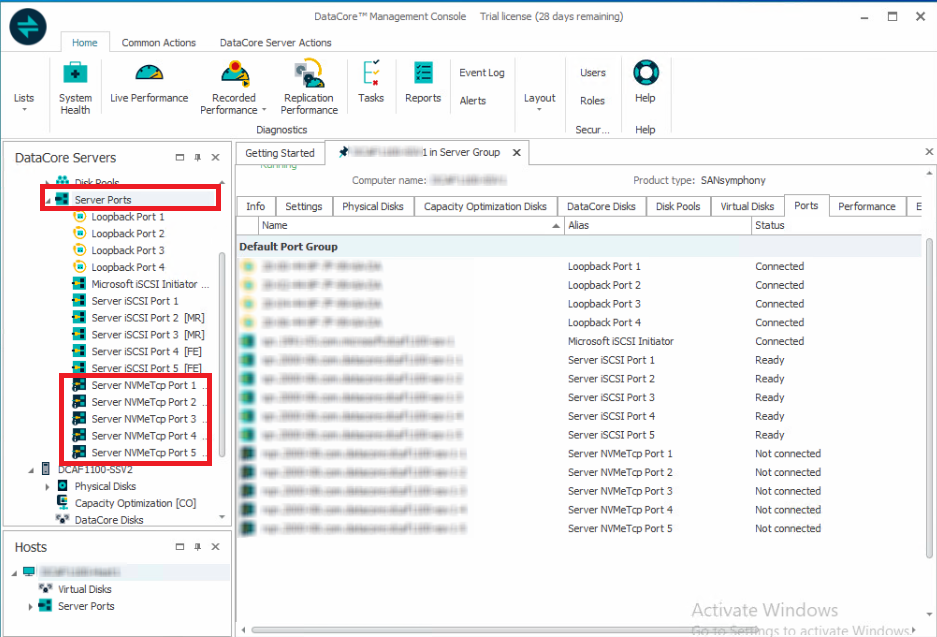
NVMe/Fibre Channel (NVMe/FC) connectivity for NVMeoF is available only after selecting the NVMeoF Enabled checkbox in the Server Group settings and then selecting the NVMeoF Front-end Capability checkbox on the corresponding Fibre Channel ports. Refer to Modifying Fibre Channel Port Settings for more information.
DataCore recommends Proxmox VE 8 for NVMeoF, as this is the version NVMeoF has been validated on.
Prerequisites
- Requires SANsymphony PSP21 or higher. For VMware ESXi hosts, SANsymphony PSP22 or higher is required.
- Emulex HBA is required only when using NVMe/FC. The NVMeoF capability is supported only on Emulex Fibre Channel ports.
- Ensure that the appropriate licenses (CSP, EN, and BR) are activated for NVMeoF features to function correctly.
- Ensure that ALUA support is enabled for the host in SANsymphony (enabled by default when the host is registered). If ALUA support is disabled, NVMeoF will not function correctly for that host.
- Internally, NVMe path state is managed using ANA (Asymmetric Namespace Access), the NVMe equivalent of ALUA. The user interface uses the ALUA label for consistency across protocols.
- Before adding a SANsymphony server that has previously operated in standalone mode with active NVMe connections to a server group, restart the server. This helps ensure that initiators can successfully connect to NVMe targets on the newly added server and that multipath connectivity functions correctly.
Enabling NVMeoF in DataCore Server Group
-
Go to Server Group and select the Settings tab
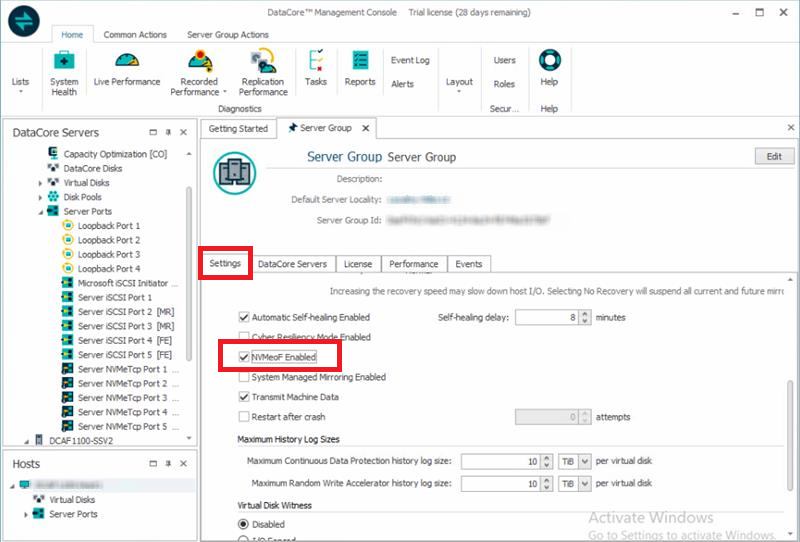
- Under Advanced Settings, select the NVMeoF Enabled checkbox to enable NVMeoF.
- Once NVMeoF is enabled in the Server Group, you can:
- Configure NVMe Server Ports. Refer to the Modifying NVMeTCP Port Settings section for details on NVMeTCP Server Port roles.
- Create an NVMe Namespace Virtual Disk. Refer to the Creating Virtual Disks section for information on enabling NVMe in Virtual Disks.
- Serve the Virtual Disk over NVMeoF.
- Mirror and Replication Paths: All mirror and replication traffic will continue to use SCSI, even if the Virtual Disk is served over NVMeoF. This ensures compatibility with existing replication and disaster recovery workflows
- NVMeoF feature does not support loopback mappings. Virtual Disks cannot be accessed over NVMeoF from the same server that hosts them.
- Refer to the General Network Adapter Settings recommendations in DataCore SANsymphony – iSCSI Network and Best Practices (formerly known as FAQ 1691 and 1626). These settings are also applicable to NVMeTCP configurations.
Connecting NVMeoF Initiators
- To connect NVMeoF initiators and discover virtual disks in Proxmox environments, refer to the Proxmox Host Configuration Guide for instructions on enabling NVMeTCP targets, configuring multipath, and connecting virtual disks.
- To connect NVMeoF initiators and discover virtual disks in VMware ESXi environments, refer to the VMware ESXi Configuration Guide for instructions on enabling NVMe over TCP on a VMkernel adapter, discovering NVMe/TCP targets, and connecting virtual disks. For details on how NVMeTCP host ports are discovered for ESXi hosts in a registered vCenter, refer to VMware vCenter Integration.
Learn More