VMware ESXi Deployment
Explore this Page
- Overview
- ESXi Host Settings
- VMware ESXi Deployment Examples
- SANsymphony Virtual Machine Settings
- ISCSI Settings - General
- Disk Storage
Overview
This section provides guidance for deploying SANsymphony in VMware ESXi hyper-converged environments, including ESXi host settings, SANsymphony virtual machine configuration recommendations, iSCSI configuration guidance, storage presentation methods, deployment examples, and VMware-specific best practices. Refer to Hyper-Converged Virtual SAN Deployment for additional deployment models, architecture guidance, and known issues related to hyper-converged environments.
Each SANsymphony instance runs in a dedicated Windows guest virtual machine on the ESXi Host.
ESXi Host Settings
Host Server BIOS
- Turbo Boost = Disabled
- Although VMware recommends enabling this feature when tuning for latency-sensitive workloads, DataCore recommends disabling it.
- This prevents disruption on the CPUs used by the SANsymphony virtual machine.
VMkernel iSCSI (VHMBA)
-
‘Delayed ACK’ = Disabled
- Path: vSphere Client > Advanced Settings > Delayed Ack
- Steps:
- Uncheck Inherit from parent
- Uncheck DelayedAck
- Reboot required: A reboot of the ESXi host will be needed after applying this change.
Reboot required: A reboot of the ESXi host will be needed after applying this change.
VMware ESXi Deployment Examples
Single DataCore Server
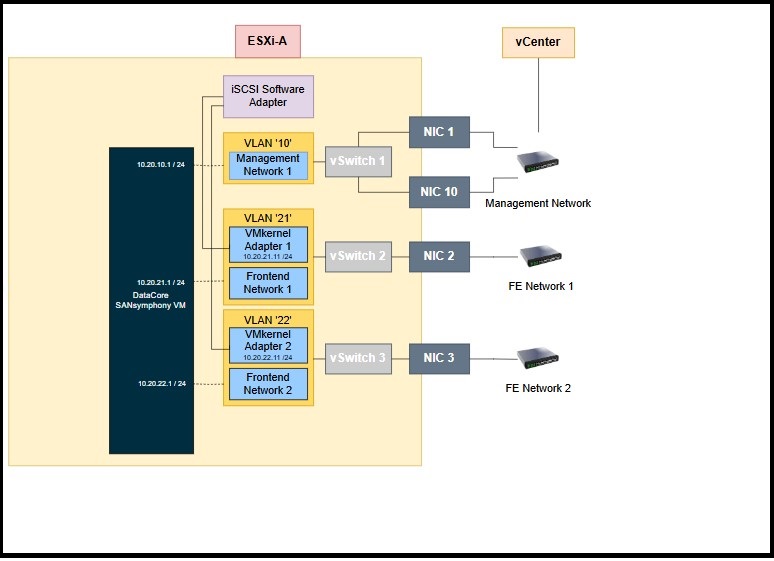
A single virtual machine configured with virtual disks served over one or more iSCSI connections. A very reliable and extremely fast DataCore Caching as well as including the entire suite of DataCore Server features.
More physical DataCore Servers can be added to create a highly available configuration. See below.
A Pair of Highly-Available DataCore Servers
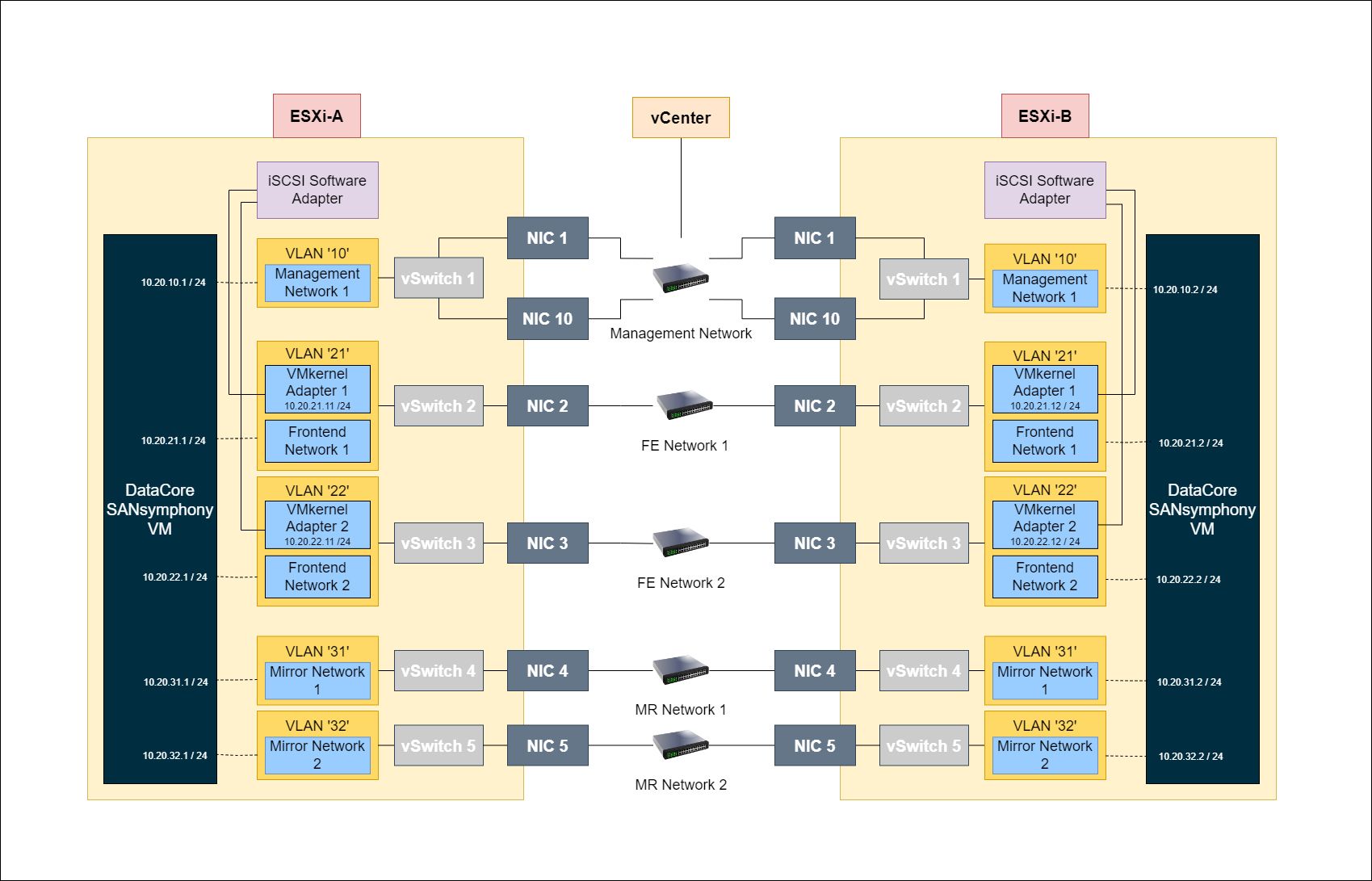
Two virtual machines configured with virtual disks served to the local ESXi Servers – ESXi A and ESXi B - over one or more iSCSI connections. The virtual disks are also as a synchronously mirrored between the DataCore servers using either iSCSI or Fibre Channel connections.
Each ESXi host’s VMkernel is configured to login to two separate iSCSI targets:
- The first path is connected to the local DataCore Server.
- The second path is connected to the remote DataCore Server.
For clarity, so as not to make the diagram too complicated, the example shows just one SANsymphony Front-end (FE) port per DataCore Server. Use more FE port connections to increase overall throughput.
SANsymphony Virtual Machine Settings
CPU
- Set to ‘High Shares’
- Reserve all CPUs used for the SANsymphony virtual machine.
- Example: if one CPU runs at 2 GHz and four CPUs are to be reserved then set the reserved value to 8 GHz (i.e. 4 x 2 GHz).
Memory
- Set to ‘High Shares’
- Set ‘Memory Reservation’ to ‘All’.
Latency Sensitivity
- Set to ‘High’[ 1 ].
- Via ‘VM settings > Options tab > Latency Sensitivity.
Refer to the following documentation for more details:
Virtual Network Interfaces (vNIC)
- Use VMXNET3.
- ‘Interrupt coalescing’ must be set to ‘Disabled’.
- Via ‘VM settings > Options tab > Advanced General > Configuration Parameters → ethernetX.coalescingScheme’; (where ‘X’ is the number of the NIC to apply the parameter).
Time synchronization
Disable time synchronization with the ESXi host in VMware Tools.
Disabling Snapshots
Set 'maxSnapshots' to 0 by adding the parameter to the .vmx file or by adding a configuration parameter through the vSphere Web Client.
UEFI Secure Boot
Secure Boot support for new SANsymphony installations was added in 10.0 PSP13. For prior releases disable any ‘Secure Boot’ option for virtual machines that will be used as SANsymphony DataCore Server otherwise the installation of DataCore’s system drivers will fail.
Also, refer to Enable or Disable UEFI Secure Boot for a Virtual Machine for more information.
ISCSI Settings - General
DataCore Servers in virtual machines should run the appropriate PowerShell scripts found attached to the Technical Support Answer. Refer to SANsymphony - iSCSI Best Practices FAQ document for more information.
Disk Storage
PCIe connected - SSD/Flash/NVMe
Internal storage to the ESXi host. DataCore recommend using VMware’s VMDirectPath I/O pass-through.
Refer to the following documentation for more details:
- Configuring VMDirectPath I/O pass-through devices
- VMware vSphere VMDirectPath I/O: Requirements for Platforms and Devices
- Fibre Channel HBA's supported by Broadcom using VM DirectPath I/O
Fibre Channel Attached Storage
Storage attached directly to the ESXi Host using Fibre Channel connections. DataCore recommend using VMware’s VMDirectPath I/O pass-through, assigning all physical Fibre Channel HBAs to the SANsymphony virtual machine. This allows SANsymphony to detect and bind the DataCore Fibre Channel driver as a Back-end connection to the storage. It is also possible to use disks presented from external FC storage as physical RDMs.
SAS/SATA/SCSI Attached Storage
Storage attached directly to the ESXi Host using either SAS/SATA/SCSI connections. If VMware’s VMDirectPath I/O pass-through is not appropriate for the storage array then contact the storage vendor to find out which is their own preferred VMware ‘SCSI Adaptor’ for highest performance (e.g. VMware’s own Paravirtual SCSI Adapter or the LSI Logic SCSI Adaptor).
ESXi Physical Raw Device Mapping (pRDM)
‘Raw" storage devices are presented to the SANsymphony virtual machine via the ESXi hypervisor. When using pRDM as storage for SANsymphony Disk Pools, disable ESXi's SCSI INQUIRY Caching. This ensures that SANsymphony can detect and report any unexpected changes in storage device paths managed by ESXi's RDM feature.
Also, refer to Virtual Machines with RDMs Must Ignore SCSI INQUIRY Cache for more information.
If VMware’s VMDirectPath I/O pass-through is not appropriate for the storage being used as RDM then contact the storage vendor to find out which is their own preferred VMware ‘SCSI Adaptor’ for highest performance (e.g. VMware’s own Paravirtual SCSI Adapter or the LSI Logic SCSI Adaptor).
VMDK Disk Devices
Storage created from VMFS datastores presented to the SANsymphony virtual machine via the ESXi hypervisor. DataCore recommends using VMware’s Paravirtual SCSI (PVSCSI) adapter using one VMDK per Datastore and provision them as ‘Eager Zeroed Thick’.This method is not recommended for use in production. Refer to Configuring disks to use Broadcom Para-virtual SCSI (PVSCSI) adapters for more information.