Hyper-Converged Virtual SAN Deployment (Formerly Known as FAQ 1155)
Explore this Page
- Overview
- Change Summary
- Storage Virtualization Deployment Models
- Microsoft Hyper-V Deployment
- VMware ESXi Deployment
- Proxmox Host Configuration
- Known Issues in Hyper Converged Virtual SAN Deployment
Overview
This FAQ covers best practices and design guidelines for deploying SANsymphony in Hyper or Hybrid-converged configurations.
The best practice for deploying SANsymphony in a hyper-converged architecture is to use the appropriate installation manager:
- VMware by Broadcom: Refer to the DataCore Installation Manager for vSphere.
- Hyper-V: Refer to the DataCore Installation Manager for Hyper-V.
- Other Options: Use the DataCore Deployment Wizard and the corresponding template.
- Proxmox: Refer to the Proxmox: Host Configuration Guide.
Change Summary
Changes since April 2020
| Section(s) | Content Changes | Date |
|---|---|---|
| Proxmox Host | Information about the HCI Proxmox Host Installation. | April 2020 |
| Microsoft Hyper-V | Secure Boot supported as of 10.0 PSP13. Recommendation to fully reserve CPU when SANsymphony is running in a Hyper-V virtual machine. | April 2020 |
| VMware ESXi | Secure Boot supported as of 10.0 PSP13. Added information about Port Binding and corrected the minimum supported release. | April 2020 |
| Proxmox Host |
|
November 2025 |
Storage Virtualization Deployment Models
This document is only concerned with either the ‘Hyper-converged’ or ‘Hybrid-converged’ deployment models. However, for completeness, all of the possible deployments are listed below.
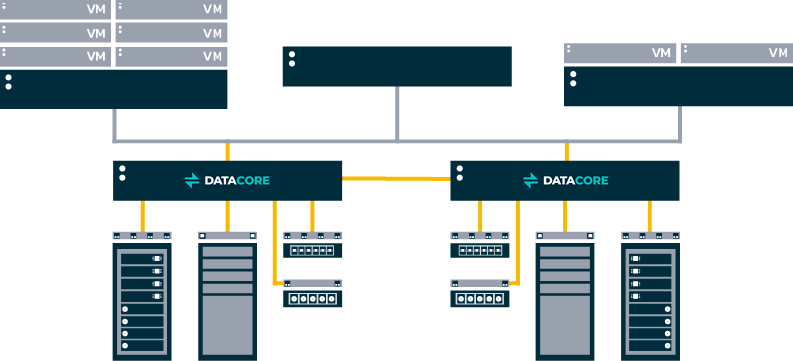
Traditional Storage Virtualization
The Host servers and the Storage arrays, managed by SANsymphony, are all physically separate from the DataCore Server.
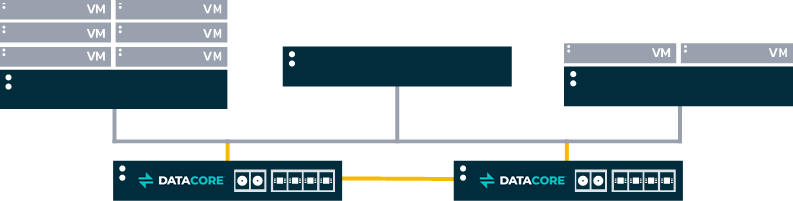
Converged
Only the Host servers are physically separate from the DataCore Server. All Storage arrays managed by SANsymphonyare internal to the DataCore Server.
Hyper-Converged
The Host servers are all guest virtual machines that run on the same hypervisor server as SANsymphony. All Storage arrays managed by SANsymphony are internal to the DataCore Server.
Internal Data and or External Disk
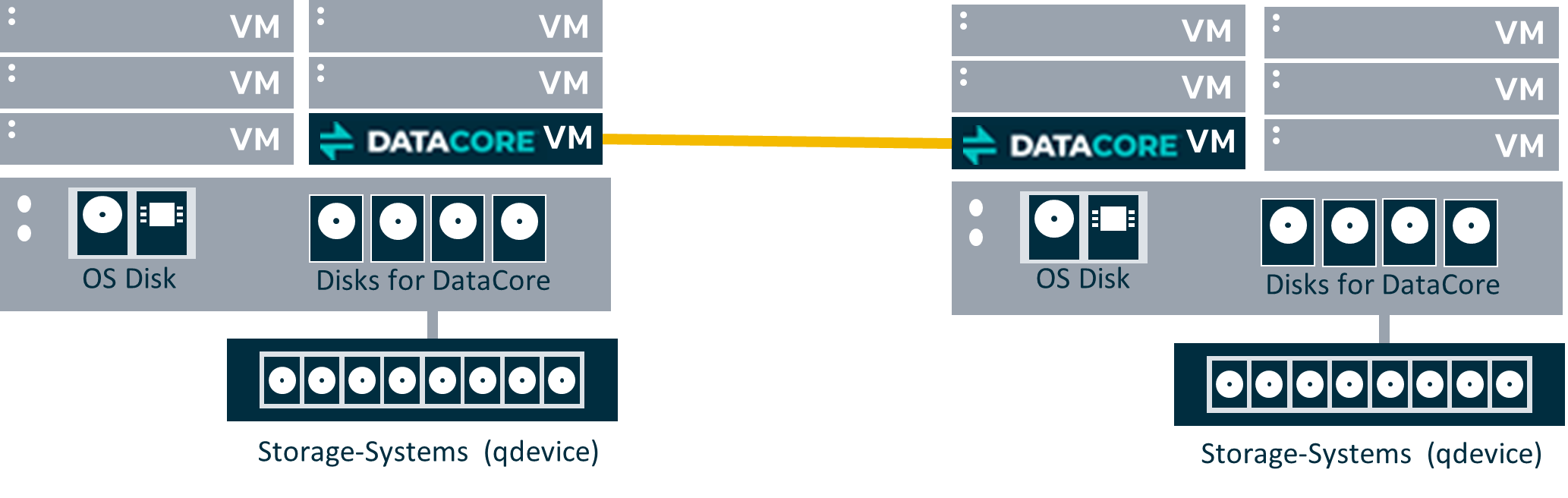
On the root partition of a Windows server (e.g. Microsoft Hyper-V)

In a virtual machine (e.g. VMware ESXi, Citrix Hypervisor, Oracle VM Server, Microsoft Hyper-V)

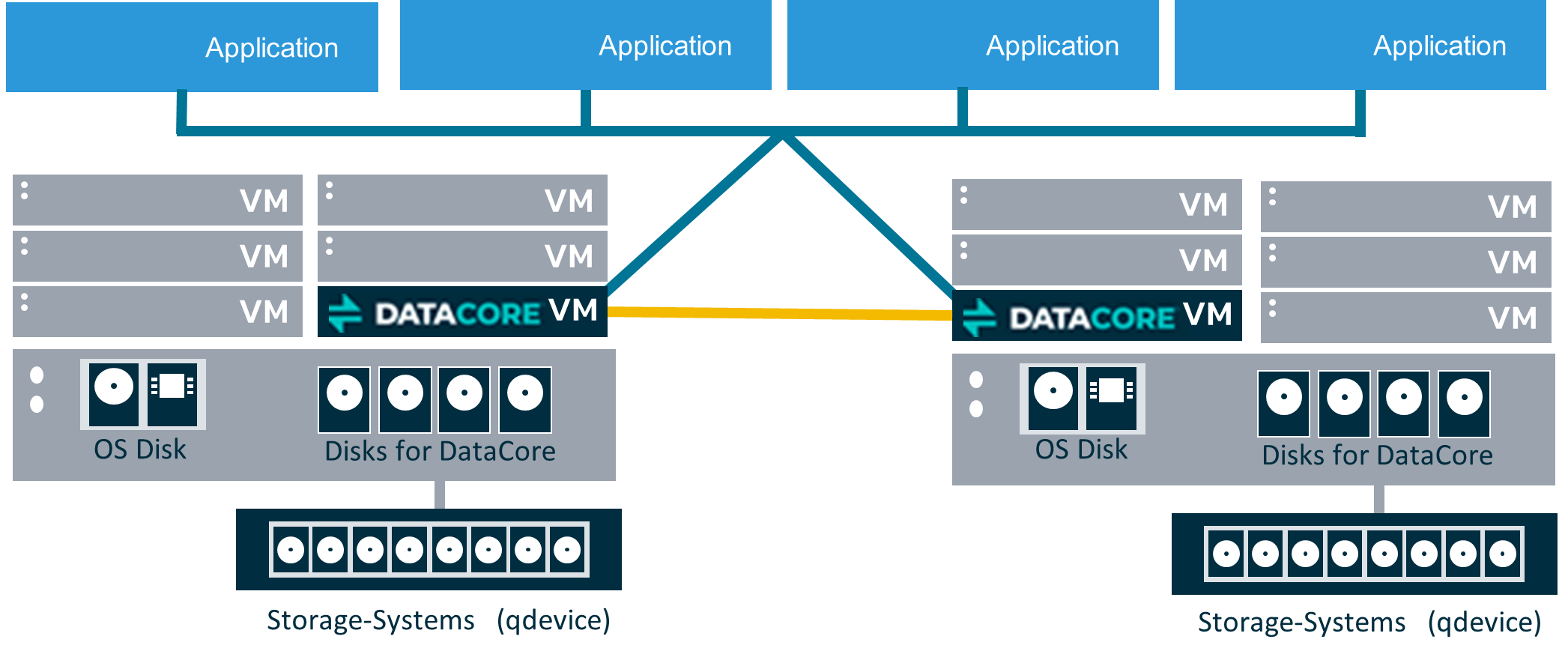
Hybrid-Converged
A combination of both Hyper-converged and Traditional Storage Virtualization. In the implementation design displayed below, the application servers run on the hypervisor, where the SANsymphony node is installed, and also attached as a physical server via iSCSI.
Microsoft Hyper-V Deployment
Refer to the Microsoft Hyper-V Deployment document for Microsoft Hyper-V deployment models, SANsymphony virtual machine configuration recommendations, deployment examples, and technical best practices for hyper-converged environments.
VMware ESXi Deployment
Refer to the VMware ESXi Deployment document for ESXi host settings, SANsymphony virtual machine configuration recommendations, deployment examples, storage configuration guidance, and VMware-specific best practices for hyper-converged environments.
Proxmox Host Configuration
Refer to the Proxmox Host Configuration document for guidance on cluster setup, SANsymphony virtual machine sizing and configuration recommendations, iSCSI and multipath configuration steps, storage presentation methods, and deployment best practices for hyper-converged environments.
Known Issues in Hyper Converged Virtual SAN Deployment
This section intends to make DataCore Software users aware of any issues that affect performance, access or may give unexpected results under particular conditions when SANsymphony is used in Hyper-converged configurations.
These known issues may have been found during DataCore’s own testing but others may have been reported by our users when a solution was found that was not to do with DataCore’s own products.
DataCore cannot be held responsible for incorrect information regarding another vendor’s products and no assumptions should be made that DataCore has any communication with these other vendors regarding the issues listed here.
We always recommend that the vendor’s should be contacted directly for more information on anything listed in this section.
For ‘Known issues’ that apply to DataCore Software’s own products, refer to the relevant DataCore Software Component’s release notes.
Microsoft Windows
ISCSI Loopback Connections
SANsymphony’s ‘Preferred Server’ setting is ignored for virtual disks using iSCSI Loopback connections.
For SANsymphony 10.0 PSP5 Update 2 and earlier
This issue affects all hyper-converged DataCore Servers in the same Server Group.
Set MPIO path state to ‘Standby’ for each virtual disk (see below for instructions).
For SANsymphony 10.0 PSP6 and later
This issue affects only any hyper-converged DataCore Servers in the same Server Group where the DataCore Server has one or more virtual disks served to them from another DataCore Server in the same group. I.e. any Server group with three or more DataCore Servers where one of more of the virtual disks is served to all DataCore Servers (instead of just the two that are part of the mirror pair).
Apart from the two DataCore Servers that are managing the mirrored storage sources in a virtual disk and will be able to detect the preferred server setting – the ‘other’ DataCore Servers will not be able to (for that same virtual disk). Set MPIO path state to ‘Standby’ for each virtual disk served to the ‘other’ DataCore Server(s). See below.
- Open the MS iSCSI initiator UI and under Targets, select the remote target IQN address.
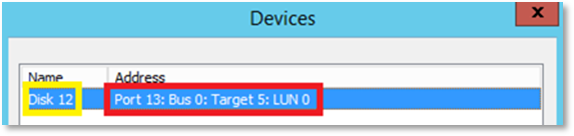
- Click Devices and identify the Device target port with disk index to update.
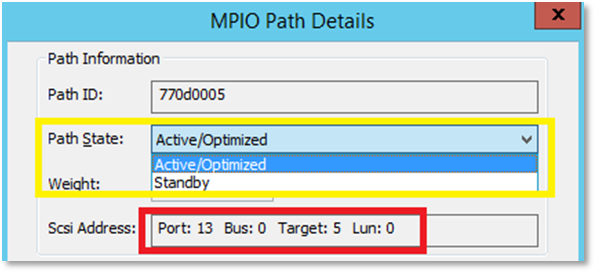
- Navigate to MS MPIO and view DataCore virtual disk.
- Select a path and click Edit.
- Verify the correct Target device.
- Set the path state to Standby and click OK to save the change.
SANsymphony’s Built-in Loopback Port
Affects clustered, hyper-converged DataCore Server
Do not use the DataCore Loopback port to serve mirrored Virtual Disks to Hyper-V Virtual Machines.
This known issue only applies when SANsymphony is installed in the root partitions of clustered, Hyper-V Windows servers where virtual disks are ‘looped-back’ to the Windows Operating system for use by Hyper-V Virtual Machines. Refer to DataCore SANsymphony Software Hyperconverged Deployments for more information.
A limitation exists in the DataCore SCSI Port driver - used by the DataCore Loopback Ports - whereby if the DataCore Server providing the ‘Active’ cluster path is stopped, the remaining DataCore Server providing the ‘Standby’ path for the Hyper-V VMs is unable to take the SCSI Reservation (previously held by the stopped DataCore Server). This will result in a SCSI Reservation Conflict and prevent any Hyper-V VM from being able to access the DataCore Disks presented by the remaining DataCore Server.
In this case please use iSCSI connections as ‘Loopbacks’ for SANsymphony DataCore Disks presented to Hyper-V Virtual Machines.
VMware ESXi
ISCSI Connections (General)
Affects ESX 6.x and 5.x
Applies to SANsymphony 10.0 PSP 6 Update 5 and earlier
ESX Hosts with IP addresses that share the same IQN connecting to the same DataCore Server Front-end (FE)port is not supported (this also includes ESXi 'Port Binding'). The FE port will only accept the ‘first’ login and a unique iSCSI Session ID (ISID) will be created. All subsequent connections coming from the same IQN even if it is a different interface will result in an ISCSI Session ID (ISID) ‘conflict’ and the subsequent login attempt will be rejected by the DataCore iSCSI Target. No further iSCSI logins will be allowed for this IQN whilst there is already one active ISID connected.
If an unexpected iSCSI event results in a logout of an already-connected iSCSI session then, during the reconnection phase, one of the other interface that shares the same IQN but was rejected previously may now be able to login and this will prevent the previously-connected interface from being able to re-connect.
Refer to the following examples of supported and not-supported configuration when using SANsymphony 10.0 PSP6 Update 5 or earlier:
Example 1: Supported configuration
The ESXi Host has four network interfaces, each with its own IP address, each with the same IQN:
| Network Interface (IP Address) | iSCSI Qualified Name (IQN) |
|
192.168.1.1 |
(iqn.esx1) |
|
192.168.2.1 |
(iqn.esx1) |
|
192.168.1.2 |
(iqn.esx1) |
|
192.168.2.2 |
(iqn.esx1) |
Example: Two DataCore Servers, each have two FE ports, each with their own IP address and each with their own IQN:
| Network Interface (IP Address) | iSCSI Qualified Name (IQN) |
|
192.168.1.101 |
(iqn.dcs1-1) |
|
192.168.2.101 |
(iqn.dcs1-2) |
|
192.168.1.102 |
(iqn.dcs2-1) |
|
192.168.2.102 |
(iqn.dcs2-2) |
Each interface of the ESXi Host connects to a separate Port on each DataCore Server:
| ESXi Host IQN | ESXi Host IP | iSCSI Fabric | DataCore Server IP | DataCore Server IQN | ||
|
(iqn.esx1) |
192.168.1.1 |
← |
ISCSI Fabric 1 | → |
192.168.1.101 |
(iqn.dcs1-1) |
|
(iqn.esx1) |
192.168.2.1 |
← |
ISCSI Fabric 2 | → |
192.168.2.101 |
(iqn.dcs1-2) |
|
(iqn.esx1) |
192.168.1.2 |
← |
ISCSI Fabric 1 | → |
192.168.1.102 |
(iqn.dcs2-1) |
|
(iqn.esx1) |
192.168.2.2 |
← |
ISCSI Fabric 2 | → |
192.168.2.102 |
(iqn.dcs2-2) |
This type of configuration is very easy to manage, especially if there are any connection problems.
Example 2 – Un-supported configuration
Using the same IP addresses as example above here is a possible scenario that would be unsupported;
| ESXi Host IQN | ESXi Host IP | iSCSI Fabric | DataCore Server IP | DataCore Server IQN | ||
| iqn.esx1 | 192.168.1.1 |
← |
ISCSI Fabric 1 | → |
192.168.1.101 |
(iqn.dcs1-1) |
| iqn.esx1 | 192.168.2.1 |
← |
ISCSI Fabric 2 | → |
192.168.2.101 |
(iqn.dcs1-2) |
| iqn.esx1 | 192.168.1.2 |
← |
ISCSI Fabric 1 | → |
192.168.1.101 |
(iqn.dcs1-1) |
| iqn.esx1 | 192.168.2.2 |
← |
ISCSI Fabric 2 | → |
192.168.2.102 |
(iqn.dcs2-2) |
In the ‘un-supported’ example, both Interfaces from ESXi1 are connected to the same Interface on the DataCore Server.
Server Hardware
Affects ESXi 6.5
HPE ProLiant Gen10 Servers Running VMware ESXi 6.5 (or Later) and Configured with a Gen10 Smart Array Controller may lose connectivity to Storage Devices.
For more information, search for a00041660en_us at HPE Support Center.
Affects ESXi 6.x and 5.x
vHBAs and other PCI devices may stop responding when using Interrupt Remapping.
VMware Tools
Affects ESXi 6.5
VMware Tools Version 10.3.0 Recall and Workaround Recommendations
VMware has been made aware of issues in some vSphere ESXi 6.5 configurations with the VMXNET3 network driver for Windows that was released with VMware Tools 10.3.0.
As a result, VMware has recalled the VMware Tools 10.3.0 release. This release has been removed from the VMware Downloads page.
Affects ESX 6.x and 5.x
Ports are exhausted on Guest VM after a few days when using VMware Tools 10.2.0 VMware Tools 10.2.0 version is not recommended by VMware. Refer to KB54459 for more information.
Failover
Affects ESX 6.7 only
Failover/Failback takes significantly longer than expected
Users have reported to DataCore that before applying ESXi 6.7, Patch Release ESXi-6.7.0- 20180804001 (or later) failover could take in excess of 5 minutes. DataCore are recommending (as always) to apply the most up-to-date patches to your ESXi operating system.
Citrix Hypervisor
Storage Repositories
Affects the hyper-converged DataCore Server virtual machine
Storage Repositories (SR) may not get re-attached automatically to a virtual machine after a reboot of the Citrix Hypervisor Host.
This prevents the DataCore Server’s virtual machine being able to access any storage used by SANsymphony’s own Disk Pools which will prevent other virtual machines -- running on the same Citrix Hypervisor Host as the DataCore Server -- from being able to access their virtual disks. DataCore recommend to serve all virtual disks to virtual machines that are running on the ‘other’ Citrix Hypervisor Hosts rather than directly to virtual machines running on the same Citrix Hypervisor as the DataCore Server virtual machine. Consult with Citrix for more information.
Learn More