Disabling Capacity Optimization (Inline Deduplication and Compression)
Disabling Capacity Optimization for a Pool
When you disable Capacity Optimization for a pool, the pool will switch to standard storage. If the pool does not have sufficient standard storage for what was in capacity-optimized storage, DataCore SANsymphony will display a message when the setting is disabled. You'll be able to close out of the message and return to the Disk Pool Details where the setting will be enabled again.
DataCore recommends stopping I/O before disabling Capacity Optimization. It may appear that there is enough standard storage to disable Capacity Optimization safely, but continuing I/O could consume space that prevents the expansion and migration from optimization storage to the pool’s standard storage.
To disable Capacity Optimization for a pool:
- Stop I/O.
- Open Disk Pool Details. (See Disk Pool Details.)
- Click the Settings tab and clear the Capacity Optimization check box.
-
Click Apply.
If there is sufficient standard storage available, DataCore Web Console will display a message about how the change will affect pool storage. If the pool does not have enough standard storage for what was in capacity optimization storage, DataCore Web Console will display a message about how much additional storage is needed.
Disabling Capacity Optimization on a Virtual Disk
When you disable Capacity Optimization on a virtual disk, the disk will switch to standard storage. If the virtual disk's pool does not have sufficient standard storage for what was in capacity optimization storage, DataCore SANsymphony will display a message when the setting is disabled. You'll be able to close out of the message and return to the Virtual Disk Details page where the setting will be enabled again.
To disable Capacity Optimization for a virtual disk:
- Open the Virtual Disk Details page. (See Virtual Disk Details and List for more information.)
- On the Settings tab, deselect the Inline Deduplication and Compression check box displayed under Capacity Optimization.
- Click Apply.
Deselecting Inline Deduplication and Compression will automatically deselect Optimize Stale Data Only option.
Disabling Capacity Optimization for a Server
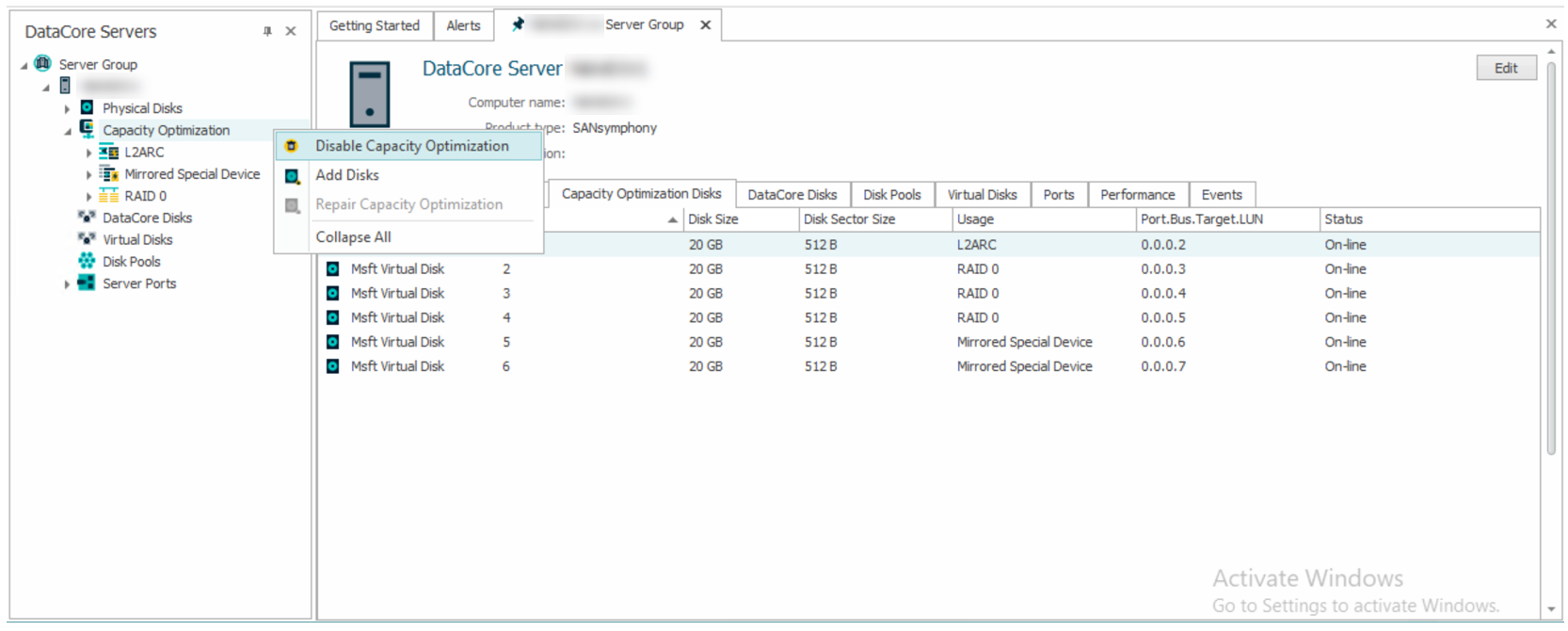
To disable Capacity Optimization for a server, disable it on all of the server's pools, and then disable Capacity Optimization on the server. After the physical disks are removed from optimized storage, they can be added to pools as usual. After Capacity Optimization is disabled, reboot the server to reclaim the previously-reserved cache.
If any of the server's pools still have Capacity Optimization enabled, and you try to disable Capacity Optimization, DataCore SANsymphony will not allow you to proceed. You will have to disable Capacity Optimization on those pools first.
To disable Capacity Optimization for a server:
- In the DataCore Servers panel, click the server drop-down from the Server Group drop-down.
-
Right-click Capacity Optimization and select Disable Capacity Optimization.
- A confirmation message is displayed. Click Yes to continue.
- Stop and restart the DataCore Server.