Data Encryption
Explore this Page
- Overview
- Requirements
- Encryption Workflow
- DiskPoolClaim-Based Encryption (Recommended Approach)
- Provisioning Encrypted Volumes
- Manual DiskPool Encryption (Advanced Configuration)
- Migration from Non-Encrypted to Encrypted Pools
- Benefits of Data Encryption
Overview
DataCore Puls8 offers support for data-at-rest encryption to ensure the confidentiality of persistent data stored on disk. Encryption is implemented at the storage pool level, enabling all volume replicas hosted on encrypted pools to be protected automatically without requiring changes at the application layer.
In DataCore Puls8, encryption is primarily configured using DiskPoolClaims, which provide a simplified and declarative method for provisioning encrypted storage pools. This approach abstracts the underlying DiskPool configuration and supports both user-managed encryption keys and integration with external Key Management Systems (KMS). For advanced use cases, encryption can also be configured manually using DiskPool resources and Kubernetes Secrets.
This document describes the recommended and advanced approaches for enabling encryption, provisioning encrypted volumes, and operational considerations for managing encrypted storage.
Requirements
Before enabling or configuring data encryption in DataCore Puls8, ensure the following prerequisites are met:
Encryption Capability Requirements
- Replicated PV Mayastor must be installed and configured
- Storage nodes must have available block devices for pool creation
- DiskPools or DiskPoolClaims must be available for provisioning encrypted storage
Storage and Scheduling Requirements
- The number of encrypted DiskPools must be equal to or greater than the replication factor
- Sufficient capacity must be available across nodes to support encrypted replicas
Operational Requirements
- Encryption must be configured before provisioning volumes
- Existing non-encrypted pools cannot be converted in-place and require migration
- Key rotation is not currently supported and must be planned accordingly
Encryption Workflow
The following workflow illustrates how encryption is configured and used in DataCore Puls8, from pool provisioning to encrypted volume creation.
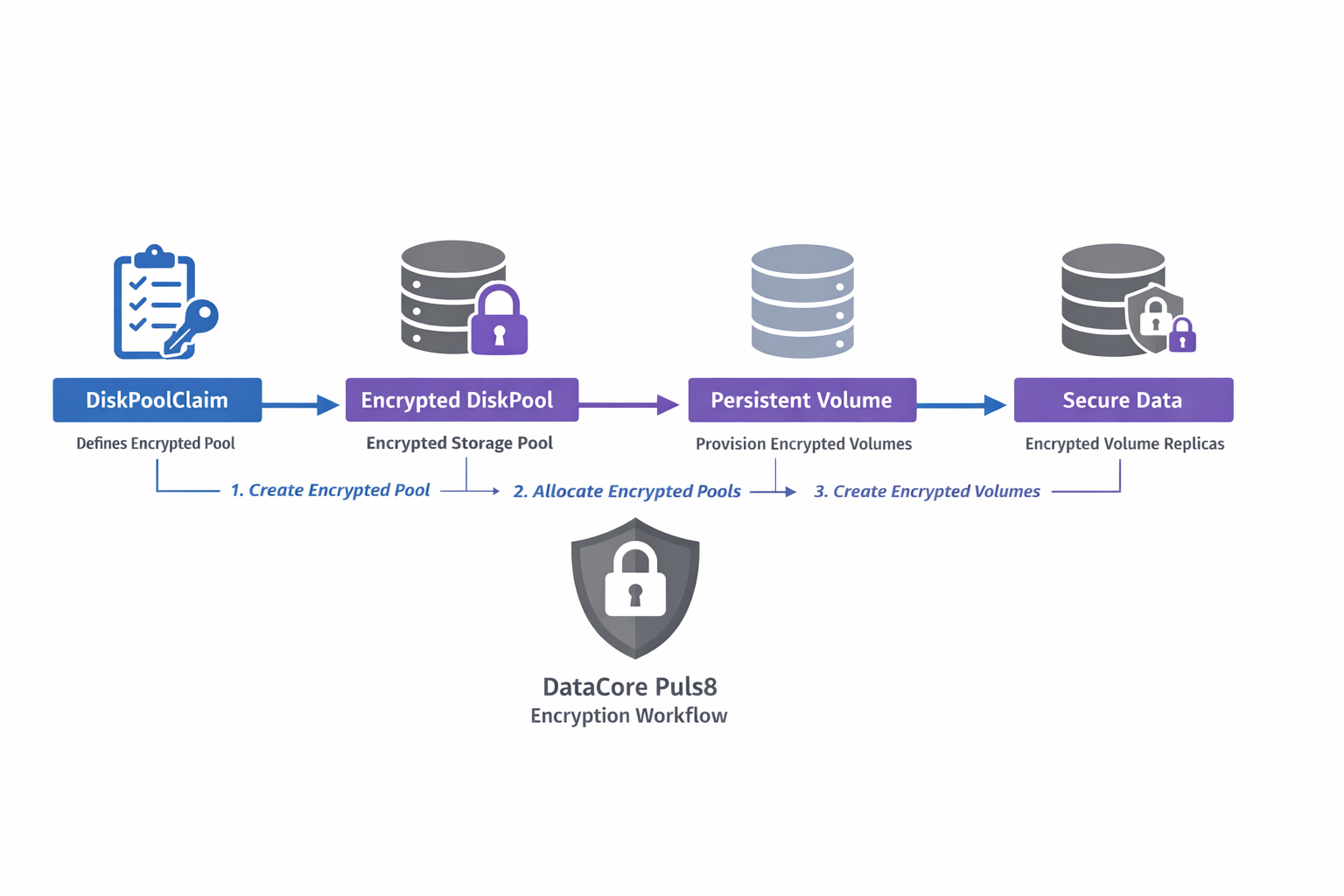
Use DiskPoolClaims for all new deployments. Manual DiskPool-based encryption should be used only for advanced or legacy scenarios.
DiskPoolClaim-Based Encryption (Recommended Approach)
DiskPoolClaims provide a higher-level abstraction for provisioning storage pools and are the preferred method for enabling encryption in DataCore Puls8. With DiskPoolClaims, encryption can be enabled as part of the pool provisioning workflow without requiring manual DiskPool configuration.
When using DiskPoolClaims, encryption keys and Kubernetes Secrets are automatically generated and managed by the system. No manual preparation is required.
When to Use This Approach
Use DiskPoolClaims for:
- All standard and production deployments
- Environments requiring scalability and consistency
- Deployments integrating with external KMS systems
Refer to the Auto-Encrypted DiskPools with KMS Integration documentation for more information.
Benefits of DiskPoolClaim-Based Encryption
- Simplifies pool creation and lifecycle management
- Supports both user-defined encryption keys and external KMS integration
- Ensures consistency across environments
- Reduces the risk of misconfiguration
Provisioning Encrypted Volumes
Encrypted volumes can be provisioned only when encrypted DiskPools are available. The number of encrypted pools must satisfy the configured replication factor.
StorageClass Configuration for Encryption
To provision encrypted volumes, set the encrypted parameter to "true" in the StorageClass definition. Volumes will be created only if the required number of encrypted pools (based on the replication factor) is available.
apiVersion: storage.k8s.io/v1
kind: StorageClass
metadata:
  name: mayastor-2-encr
parameters:
  protocol: nvmf
  repl: "2"
  encrypted: "true"
provisioner: io.openebs.csi-mayastor
reclaimPolicy: Delete
After provisioning, verify the following:
- Volumes are successfully created
- Replicas are placed only on encrypted pools
- No scheduling failures occur due to insufficient encrypted pools
 Manual DiskPool Encryption (Advanced Configuration)
This configuration method is intended for advanced or legacy use cases only. It is not recommended for new deployments. Use DiskPoolClaims for encryption whenever possible, as they provide a simplified, consistent, and safer configuration model.
- Replicated PV Mayastor uses the AES-XTS cipher for manual DiskPool encryption, which requires two 128-bit hex-encoded keys.
- Persistent device paths (for example,
/dev/disk/by-id/...) must be used. - Non-persistent device paths (for example,
/dev/sdX) are not recommended due to potential device remapping after reboot. - A Kubernetes Secret containing encryption parameters must be created before applying the DiskPool configuration.
When to Use Manual DiskPool Encryption
This approach is intended for:
- Advanced or custom deployments
- Environments not using DiskPoolClaims
- Scenarios requiring direct control over DiskPool configuration
Create Encryption Secret
Define a Kubernetes Secret containing the encryption key material. Replicated PV Mayastor supports the AES-XTS cipher, which requires two 128-bit hex-encoded keys.
apiVersion: v1
kind: Secret
metadata:
  name: pool-encr-secret
  namespace: puls8
type: Opaque
immutable: true
stringData:
  encryption_parameters: |
    {
      "cipher": "AesXts",
      "key": "2b7e151628aed2a6abf7158809cf4f3c",
      "key_len": 128,
      "key2": "2b7e151628aed2a6abf7158809cf4f3d",
      "key2_len": 128
    }
Migration from Non-Encrypted to Encrypted Pools
This procedure applies only to environments using manually configured DiskPools. When using DiskPoolClaims, migration workflows differ and are typically handled during provisioning.
Migrating existing, non-encrypted disk pools and volumes to an encrypted state requires careful planning. The ideal way to migrate or recreate existing non-encrypted pools as encrypted is to first create new encrypted pools in the cluster, provided there are available disks and sufficient capacity on the nodes. This approach allows volume replicas to be moved to encrypted pools in a staggered manner.
The key idea behind the migration is to target a pool, move its replicas elsewhere, and once the pool is empty, destroy and recreate it as an encrypted pool. As there is currently no native support for draining replicas from a pool, this process must be orchestrated manually using node cordoning and volume scaling operations.
The following procedure outlines a recommended approach:
- Identify Target Pool: Determine the non-encrypted pool (Example:
P1) to be migrated. - List Associated Volumes: Identify volumes that have replicas currently residing on
P1. - Scale Up Volumes (Optional but Recommended): Temporarily scale up the volumes (Example: From 2 to 3 replicas) to ensure redundancy during the transition.
- Cordon the Node Hosting
P1: Prevent new replicas from scheduling on the node whereP1exists by cordoning it. - Update Volume Configuration: Modify the volumes to set the
encryptedflag totrueusing themayastor plugin set volume propertycommand. - Scale Down Volumes: Reduce the replica count to remove replicas from
P1, since the node is cordoned, affected replicas will be evicted. - Recreate Pool with Encryption: Delete the original non-encrypted
P1pool and recreate it with encryption enabled, referencing the appropriate secret. - Scale Up Volumes Again: Increase the replica count. New replicas will now be provisioned on the encrypted
P1. - Adjust Replica Count Post-Migration: At this stage, volumes may temporarily run with three replicas. You may retain this configuration or scale back to two replicas by cordoning a different node that hosts a non-encrypted replica.
Throughout this process, monitor available disk capacity and pool health to avoid resource exhaustion or service interruption.
- Ensure the Kubernetes Secret is created before applying the
DiskPoolconfiguration. - Key rotation is not currently supported. Plan and manage key usage accordingly.
- Persistent device paths are required for disk pool creation. Retrieve these paths using the following command:
kubectl mayastor get block-devices <node-id> DEVNAME DEVTYPE SIZE AVAILABLE MODEL DEVPATH MAJOR MINOR DEVLINKS
/dev/sdb disk 10 GiB yes Volume /devices/pci0000:00/0000:00:02.5/0000:06:00.0/virtio5/host0/target0:0:0/0:0:0:1/block/sdb 8 16 "/dev/disk/by-path/pci-0000:06:00.0-scsi-0:0:0:1", "/dev/disk/by-id/scsi-0HC_Volume_106499042", "/dev/disk/by-id/scsi-SHC_Volume_106499042"- Migration from unencrypted to encrypted disk pools and volumes is a manual process, as described above.
Benefits of Data Encryption
- Data Security: Prevents unauthorized access to data stored on disk, even if physical media is compromised.
- Tenant Isolation: Strengthens separation of data between workloads in shared or multi-tenant clusters.
- Transparent Operations: Encryption is handled at the infrastructure level, requiring no changes from application developers or users.
Learn More