Configuring the Network
This page was deprecated on 18 August 2025. Refer to the SANsymphony WebHelp for the latest and updated documentation.
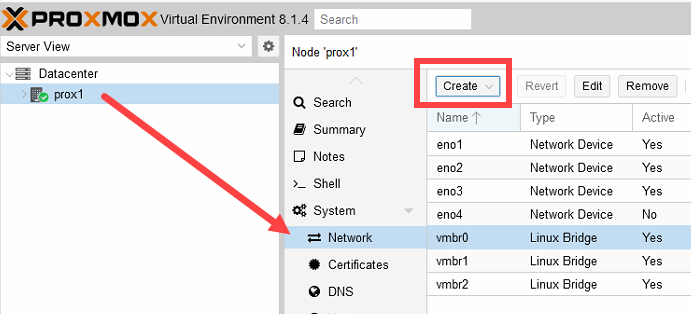
The networks or network configuration is performed in the Proxmox Host (PVE) Graphic User Interface (GUI) under Host > Network.
For each Network Interface Card (NIC) that is required for the SANsymphony iSCSI, a "Linux Bridge" vNIC (2 x FrontEnd (FE) with static IP) must be created via the Create button.
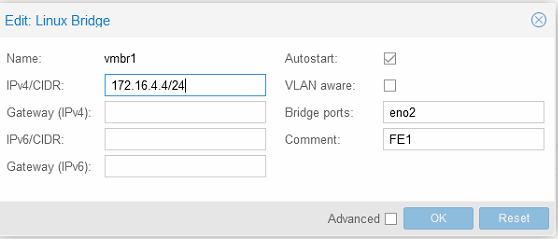
- Name: Enter an applicable name. For Example: vmbr[N], where 0 ≤ N ≤ 4094.
- IPv4/CIDR: Enter the IP address / Subnet maske.
- Autostart: Check the box to enable this option.
- Bridge ports: Enter the NIC to be used.
- Comment: It is recommended that a function name is entered here, as this makes it easier to administer the environment.
- Advanced: Select an MTU size to support the Jumbo Frames. The Add the Comment field is displayed to specify the function of the Linux Bridge.
- OK: Select OK to apply the configuration settings.
- Reset: Click this option to clear the existing options selected/ details entered, and to update different details.
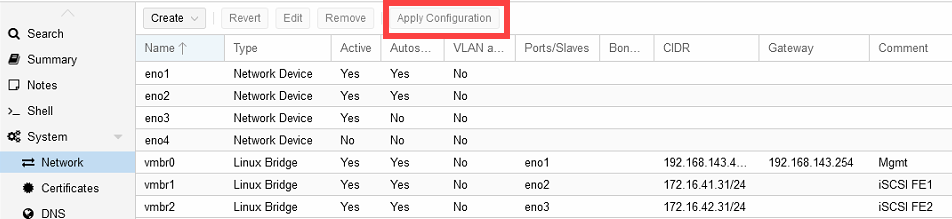
The configuration settings applied only become active after clicking the "Apply Configuration" button.